Skip to content
Read this post in: en_US
Home » AI » AI ArchiMate Diagram Generator: Create ArchiMate Diagrams in Specific Viewpoints with Visual Paradigm

AI ArchiMate Diagram Generator: Create ArchiMate Diagrams in Specific Viewpoints with Visual Paradigm

Creating ArchiMate diagrams in specific viewpoints can feel overwhelming. You need to pick the right elements, follow strict notation rules, and make sure the diagram speaks to stakeholders like business leaders or IT teams. Manual work takes hours, and one small mistake throws everything off.

That’s where an AI diagram generator changes the game. Visual Paradigm stands out as a top AI ArchiMate generator and AI-powered diagram software. Since 2002, we’ve built robust modeling tools supporting over 100 diagram types, including full ArchiMate 3 compliance. Now with AI integrated across our platforms, you generate, refine, and collaborate on ArchiMate diagrams faster than ever—while keeping everything traceable and professional.

In this post, you’ll see exactly how our four platforms handle ArchiMate diagrams in specific viewpoints (over 20 official ones supported, like Organization, Layered, Capability Map, Goal Realization, and more). Let’s explore each one.

VP Desktop: Professional Powerhouse for AI ArchiMate Generation

VP Desktop is our flagship tool—the place for serious enterprise architecture work. It’s offline-capable, packed with advanced features, and now supercharged with AI for instant diagram creation.

Want an AI ArchiMate diagram generator that delivers production-ready results? Here you select a specific viewpoint right in the AI tool, type a high-level prompt like “Generate a Layered Viewpoint for a retail digital transformation,” and boom—the AI builds a fully compliant ArchiMate diagram. It pulls in the correct elements and relationships for that viewpoint.

From there, you get full control:

  • Advanced editing with drag-and-drop precision
  • Traceability across models (see how business goals link to technology nodes)
  • Integration into larger projects—version control, team collaboration, code engineering if needed
  • Export options for reports, images, or even code stubs

Imagine you’re an enterprise architect mapping a complex migration. The AI kicks off the initial ArchiMate diagram in specific viewpoint (say, Implementation and Migration Viewpoint), saving hours on setup. Then you refine it manually for accuracy. No other tool blends AI speed with this level of depth. It’s why teams choose Visual Paradigm for scalable, error-free modeling.

Download Visual Paradigm Here

How to Generate a ArchiMate Diagram with AI in VP Desktop

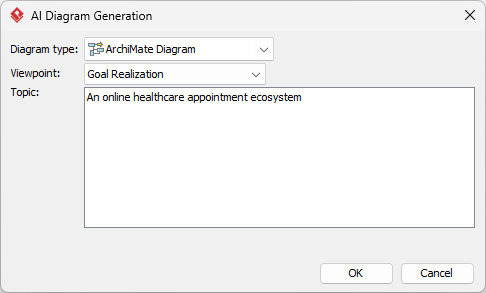
  1. From the main menu, select Tools > AI Diagram Generation. This opens the AI Diagram Generation window.
  2. In the window, choose your desired diagram type from the dropdown list. In this case, ArchiMate Diagram.
  3. Select the Viewpoint.
  4. In the text area, describe your project, problem, system, or scenario.

  5. Click OK to start the generation.
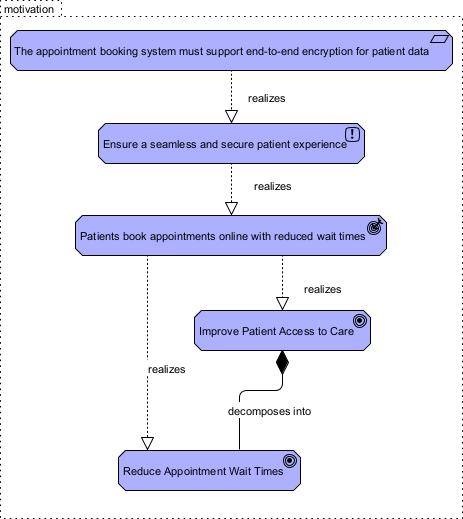
  6. The AI will create the diagram automatically.

    An ArchiMate diagram (in specific viewpoint) generated by Visual Paradigm Desktop's AI Diagram Generator for ArchiMate

    It appears as a fully editable, native Visual Paradigm diagram (not just an image). You can now:

    • Edit elements, relationships, layout, or properties

    • Add more details manually
    • Export as image (PNG, SVG, etc.), PDF, or use in reports
    • Generate code or documentation if applicable

OpenDocs: Embed and Collaborate on ArchiMate Diagrams

OpenDocs brings a fresh twist—think smart documents like Notion or GitBook, but built for visual modeling. Right now, full AI generation of ArchiMate diagrams in specific viewpoints isn’t supported here yet. But you can embed and work with diagrams created in other platforms.

Picture this: You generate an Organization Viewpoint in VP Desktop or the Chatbot, then drop it straight into an OpenDocs page. The diagram stays live and editable. Team members click to tweak elements without leaving the document. Perfect for wikis, strategy guides, or knowledge bases where ArchiMate visuals explain processes alongside text.

Benefits shine in collaboration:

  • Diagrams update dynamically—no static screenshots
  • Encourages team alignment—everyone sees the latest version
  • Great for non-modelers who need to review or comment

While we continue expanding AI directly in OpenDocs, it already plays a key role in the ecosystem by making ArchiMate diagrams accessible and shareable.

AI Visual Modeling Chatbot: Conversational AI for Fast Iteration

Our AI Visual Modeling Chatbot turns diagramming into a conversation. This is where speed meets flexibility—ideal when you’re brainstorming or need quick prototypes.

Just tell it: “Create an ArchiMate Capability Map viewpoint for a healthcare provider’s patient record system.” The chatbot generates the diagram instantly, supporting over 20 viewpoints.

Why users love it:

  • Natural language—no need to remember exact syntax
  • Interactive—ask for explanations, generate reports, or analyze impacts
  • Standalone or linked to desktop—export to VP Desktop for deeper work
  • Overcomes blank-page syndrome in agile teams

One architect described it as a “true co-pilot.” You describe a complex enterprise setup in plain English, get an ArchiMate diagram in a specific viewpoint seconds later, then iterate until it fits. Combine this with desktop refinement, and you’ve got an unbeatable workflow for exploratory modeling.

How to Generate a ArchiMate Diagram with AI Chatbot

  1. Open the AI Chatbot:

  2. Start a new chat session: Click New Chat (on the left sidebar or as a prominent button) to begin a fresh conversation.

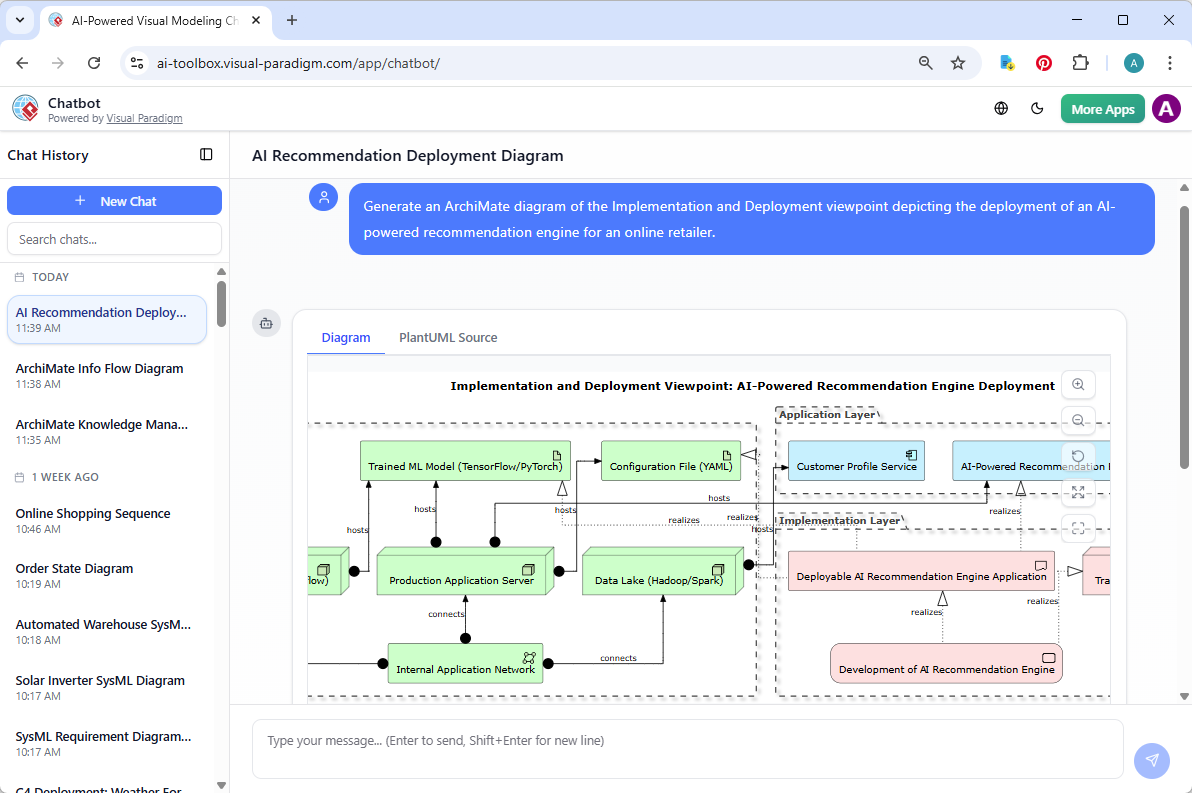
  3. Describe what you want: In the text input area at the bottom, type a clear description of your project, system, or scenario (e.g. “Generate an ArchiMate diagram of the Implementation and Deployment viewpoint depicting the deployment of an AI-powered recommendation engine for an online retailer.”). Press Enter (or click the send icon) to submit your message. Do remember to specify the viewpoint in the prompt.

  4. View and refine the diagram: The AI generates the diagram almost instantly.

    An ArchiMate diagram generated with Visual Paradigm's AI Chatbot for visual modelers. (In specific viewpoint)

    This is where the chatbot shines: keep the conversation going! Follow-up examples:

    • “Add an element…”
    • “Explain the diagram…. “
    • “Generate a brief report summarizing ….”

Why Visual Paradigm Stands Out as the Ultimate AI Diagram Tool

Plenty of tools offer AI diagram generation. Few match our full ecosystem. Competitors might give you one-shot images or basic sketches. We deliver true end-to-end support:

  • Widest coverage—ArchiMate plus UML, BPMN, SysML, and more
  • Real traceability—not just pretty pictures, but linked, maintainable models
  • Multiple workflows—chat for speed, desktop for precision, docs for sharing
  • Seamless handoff—start in chatbot, refine in desktop, embed in OpenDocs

No silos. No starting over. You save time, cut errors, and build professional, implementation-ready models. Whether you’re after the best AI tool for creating ArchiMate diagrams, a free AI ArchiMate diagram maker trial, or an online AI diagram editor for professionals, Visual Paradigm covers it. Our AI integration accelerates everything without sacrificing control or standards compliance.

Ready to Transform Your ArchiMate Modeling?

Stop wrestling with manual ArchiMate diagrams in specific viewpoints. With Visual Paradigm’s AI ecosystem, you generate them instantly, refine them intelligently, and collaborate effortlessly.

Try Visual Paradigm today—experience the future of AI diagramming. Sign up for a free trial and see how our AI ArchiMate generator and AI-powered diagram software make complex enterprise architecture simple and fast.

Your next great viewpoint is just a prompt away.

Leave a Reply