


Hey there! 👋 Let’s be real for a second—trying to map out a massive web-based e-commerce system with all its moving parts like servers, databases, and payment gateways can feel like trying to untangle a drawer full of old charging cables. It’s stressful, messy, and honestly, who has the time to manually draw every single 3D box and connection anymore? That’s where the magic of the AI Deployment Diagram Generator comes in, and trust me, it’s a total game-changer for your workflow. If you’ve ever stared at a blank white screen in Visual Paradigm feeling that “where do I even start?” anxiety, you’re going to love how this AI-powered visual modeling software basically does the heavy lifting while you sip your coffee and look like a total pro.
Visual Paradigm has evolved into this super cool, comprehensive AI-powered visual modeling ecosystem that doesn’t just let you draw; it understands what you’re trying to build. Whether you’re a hardened system architect or a student just trying to survive a cloud computing project, the ability to turn a simple paragraph of text into a high-level, professional deployment diagram is basically a superpower. Imagine just telling the computer, “Hey, I’ve got two web servers on AWS and a PostgreSQL database,” and watching the nodes and artifacts pop into existence with perfect UML notation—it’s honestly such a vibe.
Transforming Your Architecture Ideas into Instant Reality
The journey starts in the Visual Paradigm Desktop app, where things are super easy-to-use even if you aren’t a UML wizard yet. You just navigate to the AI Diagram Generation tool, and you’re greeted with a simple, friendly window where you can choose your diagram type. As we see in the first look at the interface, the user is typing a description for a web-based e-commerce application, letting the AI know exactly what needs to be visualized without needing to click through a thousand different menus or drag-and-drop elements for hours.
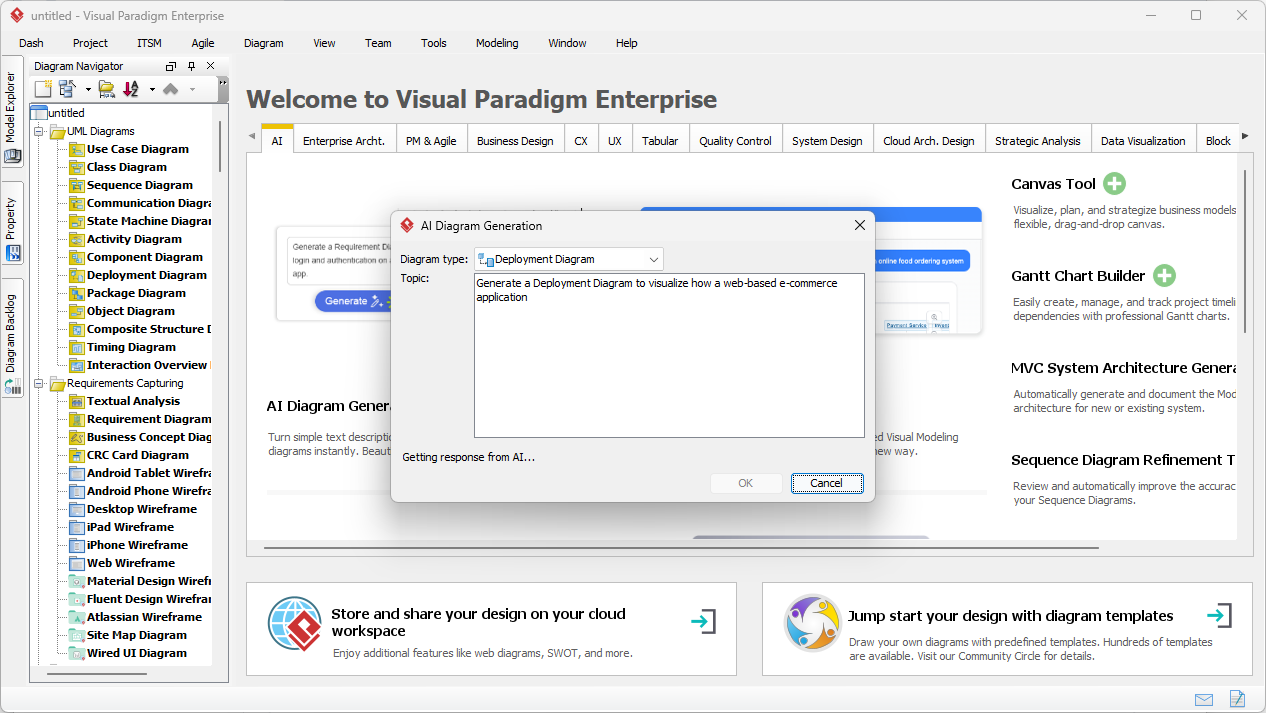
This initial step is where the best AI Deployment Diagram Generator really shows its worth because it handles the logic for you. You aren’t just getting a random collection of shapes; the AI is actively listening to your requirements to identify which parts are hardware nodes, which are software execution environments, and which are the actual artifacts like WAR or JAR files. It’s like having a conversation with an intelligent diagram maker that knows exactly how a modern cloud infrastructure should look, making the whole process feel soothing and totally under control.
Key Takeaways for Using AI in Visual Modeling
- Speed is King: You can go from a blank page to an 80% complete diagram in mere seconds, leaving only the fine-tuning for you.
- UML Compliance: No more worrying if you used the right stereotype—the professional AI diagram tool applies <<device>>, <<executionEnvironment>>, and <<artifact>> automatically.
- Flexibility: The output isn’t a static image; it’s a fully editable native diagram that you can tweak, color-code, or expand upon whenever you want.
- Reduced Cognitive Load: By letting the AI handle the layout and initial structure, you can focus on the high-level architecture decisions instead of pixel-pushing.
From Textual Prompts to Professional UML Models
Once you hit that OK button, the AI Deployment Diagram Generator kicks into high gear, analyzing your “Topic” and constructing a logically organized view of your system. In our second visual reference, you can see the crisp, vibrant results of the e-commerce application prompt. It has beautifully laid out the “User Device,” the “Web Server” (containing the Product Catalog and the E-Commerce Website artifact), and the “Database Server” with its “Order Management” component. It even intelligently connected everything to a “Payment Gateway” node! The layout is so clean and balanced, with those soothing blue tones making the complex relationships between the physical hardware and the software components feel totally manageable and clear.
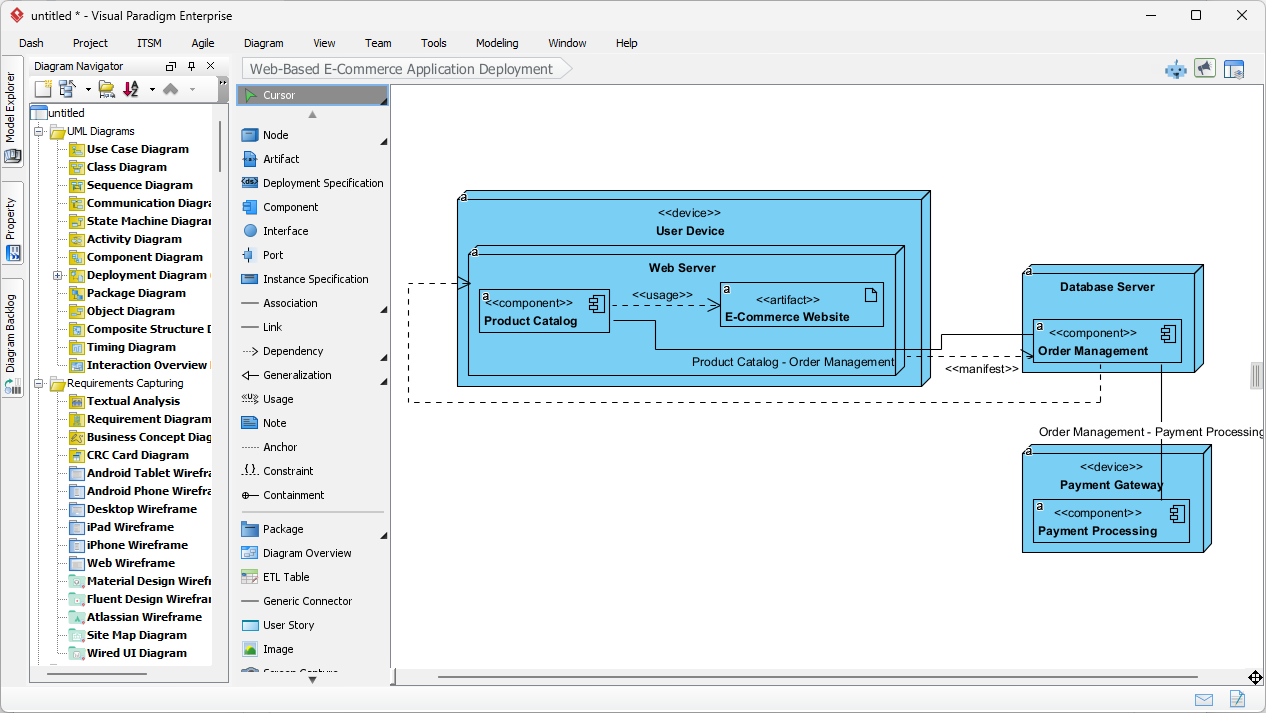
The beauty here is that this online-integrated AI architecture visualization software understands deployment specifications and communication paths without you having to manually draw every line. Notice how the stereotypes like <<component>> and <<manifest>> are already there, properly placed and formatted. It’s this attention to detail that makes Visual Paradigm the best easy-to-use AI diagramming software on the market today. You’re not just getting a “pretty picture”—you’re getting a standard-compliant model that’s ready for an enterprise-level architecture review or a deep-dive DevOps planning session.
The Conversational Power of the Visual Paradigm AI Chatbot
But wait, it gets even cooler! If you’re someone who prefers a more conversational approach—maybe you’re on the go or just like the “chat” interface—the Visual Paradigm AI Chatbot is basically your new best friend. Accessible at chat.visual-paradigm.com, this AI-powered visual modeling chatbot turns plain English commands into diagrams across dozens of standards. In our third image, we see a user asking for a deployment architecture for a “video streaming platform.” The chatbot doesn’t just give you a list of steps; it generates a beautiful, color-coded diagram right in the chat window, featuring a Media Server, Content Delivery Network (CDN), and even an OAuth Service on a User Authentication Server.
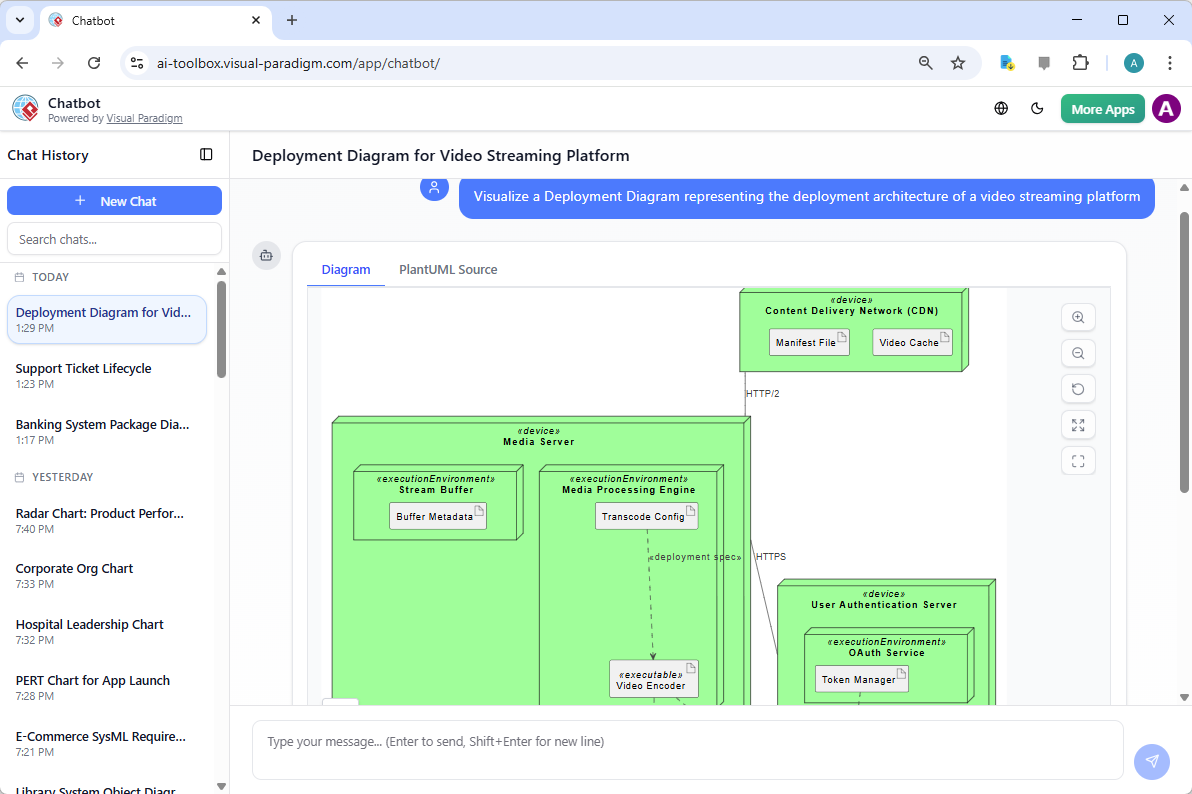
This best AI chatbot for diagramming is perfect for those brainstorming sessions where you’re just throwing ideas around. You can ask it to “Add a load balancer” or “Move the database to a private subnet,” and it iterates with you in real-time. It’s a very relaxed way to work that completely eliminates the “blank canvas syndrome” we all hate so much. Whether you’re building a C4 model, a SysML requirement diagram, or a complex UML deployment view, the chatbot makes the whole experience feel like a collaborative effort rather than a solo chore.
Understanding the Terminology (Don’t Worry, It’s Simple!)
If you’re new to this, the terminology might sound a bit “techy,” but don’t sweat it. Here’s a quick guide to what the AI Deployment Diagram Generator is actually putting on your screen:
Term What it actually is (The chill version) Node A box representing a computer, server, or phone where stuff happens. Artifact The actual files or software pieces (like a .zip or .exe) being installed. Execution Environment The software “host” like Tomcat, Docker, or Node.js that runs your code. Communication Path The lines that show how your servers talk to each other (the internet, APIs, etc.). Stereotype The labels in <<brackets>> that tell you exactly what an object’s job is.
Level Up Your Productivity Today
In the end, using an AI Deployment Diagram Generator isn’t about being lazy—it’s about being smart with your time and energy. Visual Paradigm has created an ecosystem where you can jump between the deep, robust modeling of the desktop application and the quick, intuitive brainstorming of the AI Chatbot. You get to keep that sophisticated rhythm in your work while the professional AI visual modeling software handles the tedious parts. From the moment you input your first description to the second you export a high-resolution PNG for your project proposal, the process is designed to be as soothing and efficient as possible.
So, why keep struggling with manual box-drawing when you can have an AI assistant help you build the physical architecture of your dreams? Whether it’s an e-commerce platform, a video streaming service, or a complex distributed network, the tools are right here waiting for you. It’s time to stop worrying about the notation and start focusing on the innovation! 🚀
Ready to see the magic for yourself?
You can start creating AI-powered deployment diagrams and 40+ other diagram types right now. It’s time to supercharge your modeling workflow and leave the manual struggle behind forever.
Experience the future of diagramming: Download Visual Paradigm Now and try the AI Deployment Diagram Generator today!
Related Links
The following resources examine the application of artificial intelligence to the creation and optimization of UML deployment diagrams. These articles highlight specialized tools that allow for the automated generation of system architecture from natural language prompts, specifically focusing on cloud-based applications and the C4 modeling standard. By integrating AI assistants, developers and architects can more effectively visualize the physical distribution of software components across nodes and hardware configurations.
- How to Create a UML Deployment Diagram for Cloud Apps with AI: This article provides a step-by-step guide to using AI-powered tools to efficiently generate UML deployment diagrams for cloud applications.
- AI-Powered C4 Diagram Generator – Visual Paradigm AI: This specialized generator supports the core levels of the C4 Model, including deployment views, to provide comprehensive architectural documentation through AI-driven automation.
- AI Chatbot for Diagram and Model Generation: This interactive interface allows users to generate various UML interaction and structural models, including deployment diagrams, using simple natural language input.
- What is a Deployment Diagram? A Complete Guide to UML Deployment Diagrams: This guide offers a thorough overview of deployment diagrams in UML, covering their fundamental components, purpose, and best practices for modeling software system architecture.
- Beginner’s Guide to Deployment Diagrams Using Visual Paradigm Online: This resource serves as an introductory guide for beginners using web-based tools to model system deployment and IT infrastructure.
- How to Draw a Deployment Diagram in UML: Step-by-Step Tutorial: This comprehensive tutorial walks users through the process of creating UML deployment diagrams by detailing artifacts, nodes, and complex system relationships.
- Step-by-Step Tutorial: Creating Deployment Diagrams with Visual Paradigm: Users can learn to build detailed deployment diagrams from scratch through this hands-on tutorial that covers nodes and real-world interactions.
- Comprehensive Tutorial on Deployment Diagrams with Visual Paradigm: This resource provides an in-depth tutorial on designing and implementing deployment diagrams specifically for real-world system architecture scenarios.
- Free Deployment Diagram Tool – Visual Paradigm Online: This web-based solution allows for the free modeling of system deployment and architecture without requiring a local software installation.
- Deployment Diagram Examples in Visual Paradigm Gallery: This gallery features a curated collection of real-world deployment diagram examples to inspire and guide professional system architecture modeling.