


Creating a C4 system context diagram can feel overwhelming. You stare at a blank canvas, trying to map out your software system’s high-level relationships—users, external systems, boundaries—while keeping everything clear, accurate, and standards-compliant. Manual tools slow you down, and many AI diagram generators fall short on depth or integration.
That’s where Visual Paradigm changes the game. As a leading AI diagram tool since pioneering visual modeling in 2002, we deliver the most complete ecosystem for AI-powered diagram creation. Our four platforms work together seamlessly: generate a C4 system context diagram instantly, refine it professionally, embed it in docs, or guide it step-by-step. No silos, no lost traceability—just a smooth workflow from idea to implementation-ready model.
In this guide, you’ll discover how Visual Paradigm supports C4 system context diagrams (and the full C4 suite) better than any other AI diagram generator. Let’s explore each platform and see why teams choose us for reliable, scalable visual modeling.
VP Desktop: Your Powerhouse for Professional AI-Driven C4 Modeling
VP Desktop stands as Visual Paradigm’s flagship application. It’s built for serious architects and developers who need precision and control. The AI diagram generator here integrates directly into a robust desktop environment, perfect for complex projects.
Start by describing your system in plain text—”an online banking platform with mobile app users, core banking services, payment gateways, and regulatory compliance systems.” Our AI instantly builds a clean C4 system context diagram, complete with actors, external dependencies, and clear boundaries. Unlike basic AI tools that spit out images, this creates fully editable, native diagrams.
- Advanced editing follows generation—adjust layouts, add traceability links, or connect to other models like UML or SysML.
- Full offline support ensures security for enterprise work.
- Export options include code engineering, reports, or integration with version control for teams.
Imagine generating the initial C4 system context diagram in seconds, then spending your time on real decisions: refining relationships or ensuring architectural alignment. VP Desktop delivers that blend of AI speed and professional depth no standalone AI diagram tool can match.
How to Generate a C4 System Context Diagram with AI in VP Desktop
- From the main menu, select Tools > AI Diagram Generation. This opens the AI Diagram Generation window.
- In the window, choose your desired diagram type from the dropdown list. In this case, C4 Model.
- Select System Context for Diagram.
- In the text area, describe your project, problem, system, or scenario.
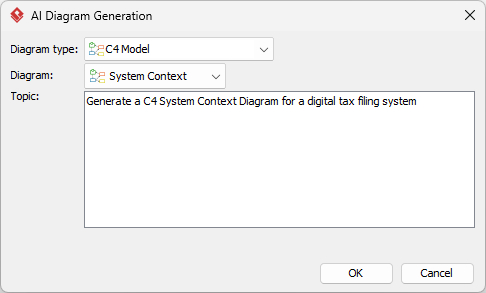
- Click OK to start the generation.
- The AI will create the diagram automatically.
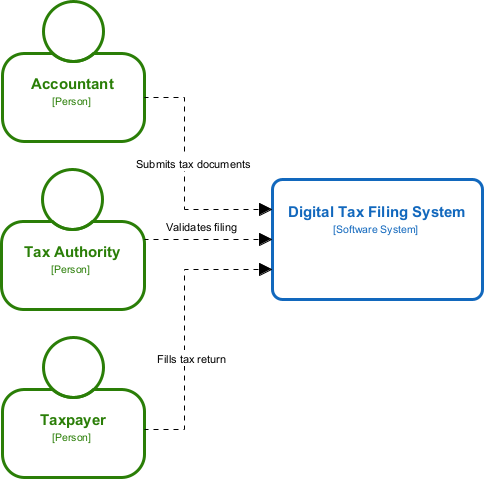
It appears as a fully editable, native Visual Paradigm diagram (not just an image). You can now:
- Edit elements, relationships, layout, or properties
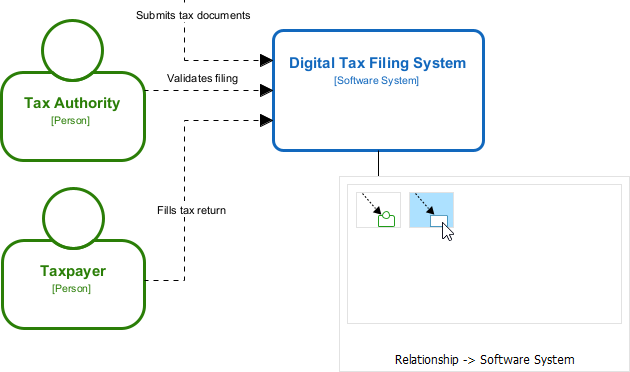
- Add more details manually
- Export as image (PNG, SVG, etc.), PDF, or use in reports
- Generate code or documentation if applicable
- Edit elements, relationships, layout, or properties
AI Visual Modeling Chatbot: Conversational Magic for Fast C4 Prototyping
Need a quick C4 system context diagram during a brainstorming session? Our AI Visual Modeling Chatbot turns natural language into professional visuals through simple conversation.
Just chat: “Generate a C4 system context diagram for an e-commerce platform including customers, admin panel, payment processor, inventory system, and shipping partners.” The chatbot responds instantly with a well-structured diagram. Ask follow-ups—”Add fraud detection service as an external system” or “Explain the boundaries”—and it refines everything on the fly.
- Handles the full C4 suite, including system context, containers, components, and more.
- Explains concepts, suggests improvements, or generates reports from your model.
- Ideal for agile teams overcoming blank-canvas blocks or prototyping ideas rapidly.
This isn’t a one-shot generator. It’s a true co-pilot that bridges beginners to expert outputs. Many users start here for speed, then move to VP Desktop for polish—seamless handoff keeps your workflow fluid.
How to Generate a C4 System Context Diagram with AI Chatbot
-
Open the AI Chatbot:
- Web access: Go to https://chat.visual-paradigm.com/ (or https://ai-toolbox.visual-paradigm.com/app/chatbot/ as an alternative entry point).
- VP Desktop access: In Visual Paradigm Desktop, select Tools > Chatbot from the main menu. (This opens the same AI assistant integrated within your desktop environment.)
-
Start a new chat session: Click New Chat (on the left sidebar or as a prominent button) to begin a fresh conversation.
-
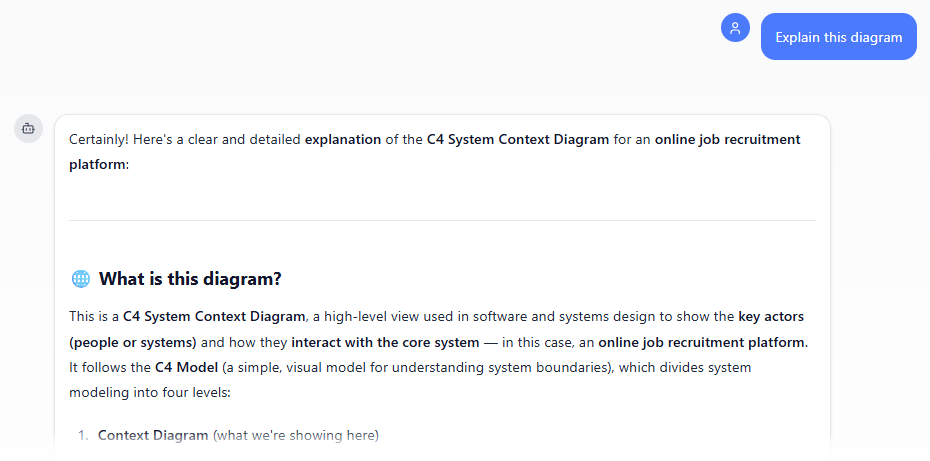
Describe what you want: In the text input area at the bottom, type a clear description of your project, system, or scenario (e.g. “Create a C4 System Context Diagram for an online job recruitment platform”). Press Enter (or click the send icon) to submit your message.
-
View and refine the diagram: The AI generates the diagram almost instantly.
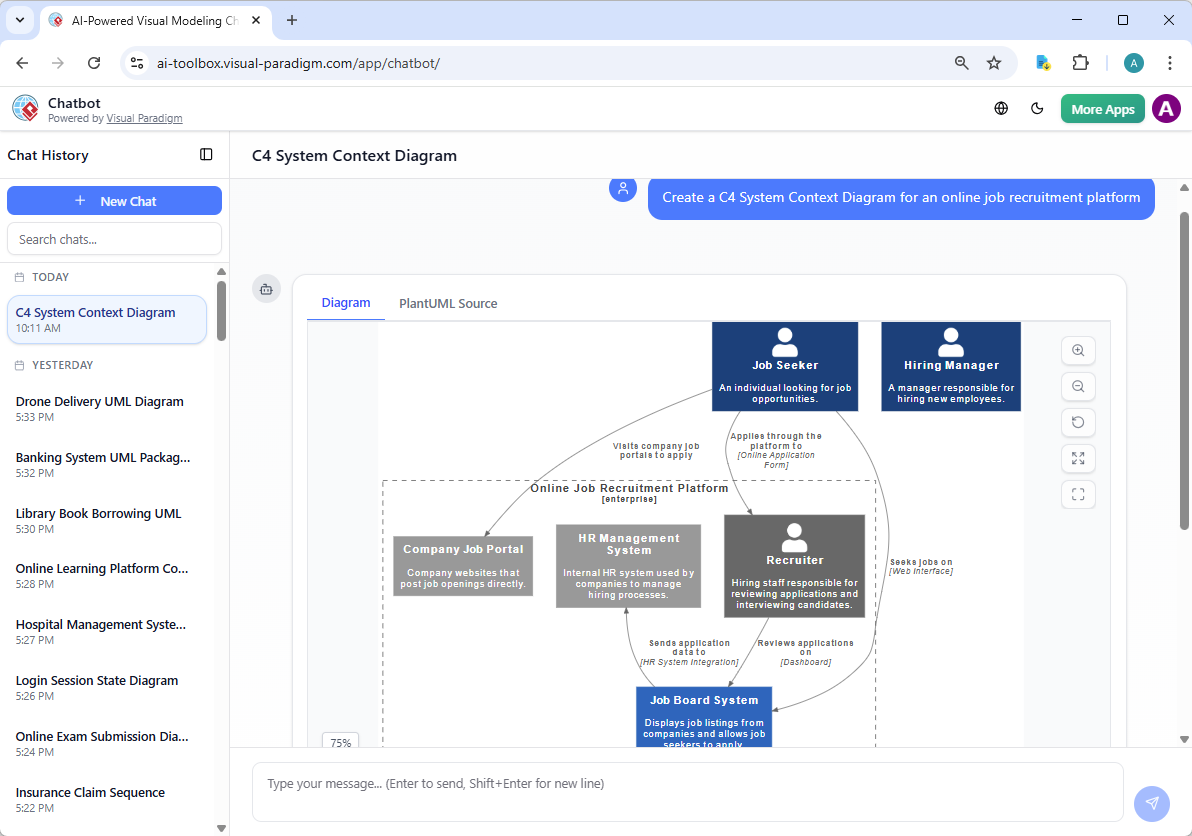
This is where the chatbot shines: keep the conversation going! Follow-up examples:
- “Add an element…”
- “Explain the diagram…. “
- “Generate a brief report summarizing ….”
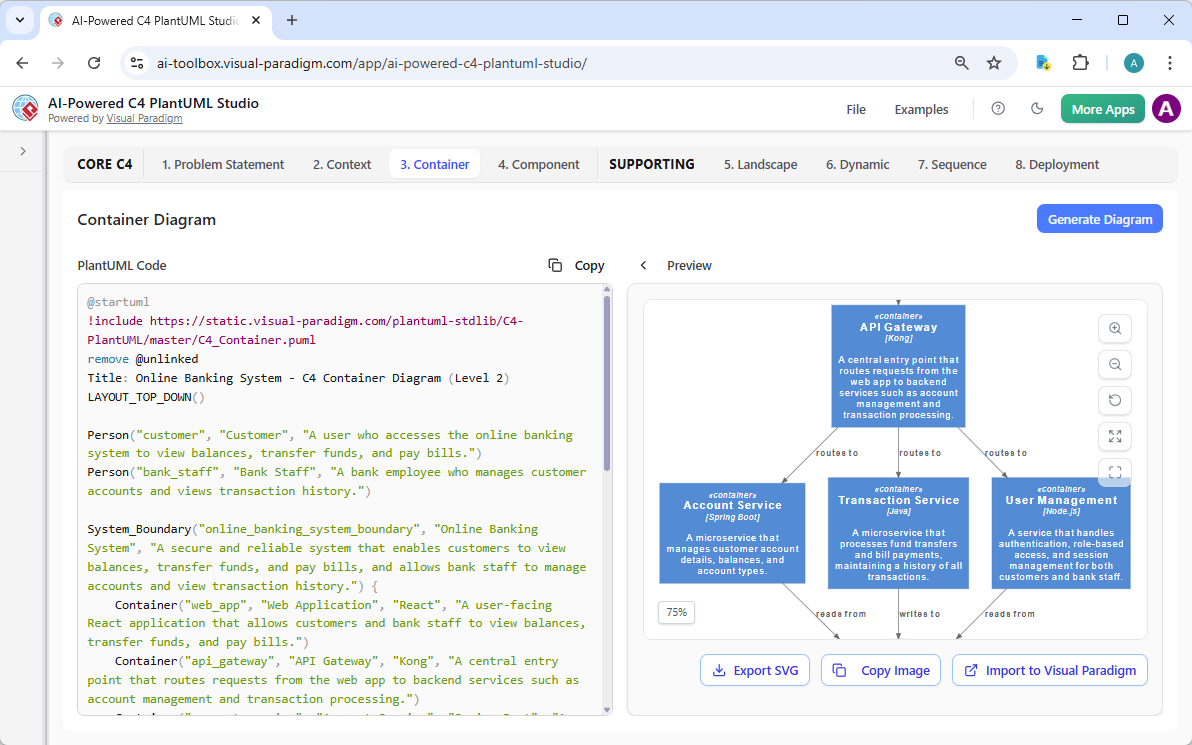
Web Apps: Guided, AI-Powered Precision with C4 PlantUML Studio
Our Web Apps deliver specialized, browser-based tools with structured guidance. The standout for C4 work is the AI-Powered C4 PlantUML Studio – an online AI diagram generator tailored for software architecture. It uses AI to generate complete, hierarchical C4 diagrams (Context, Container, Component) plus supporting views like Sequence and Deployment directly from a plain-language problem statement or project description, producing valid PlantUML code with live previews for instant refinement and iteration.
Learn more about AI-Powered C4 PlantUML Studio
Why Visual Paradigm Stands Out as the Ultimate AI Diagram Tool
Plenty of AI diagram makers promise quick sketches. Few deliver a complete solution. Visual Paradigm leads because we integrate AI across every stage: instant generation, professional refinement, collaborative embedding, and guided precision.
Key advantages over competitors:
- Widest coverage—full C4 support many other diagram types, not just trendy ones.
- True traceability and interconnection—diagrams link across platforms, staying consistent as projects evolve.
- Multiple workflows in one ecosystem—chat for speed, desktop for depth, docs for sharing, web for guidance.
- Real usability for teams—enterprise features like collaboration, version control, and export to code or docs.
Other tools might generate a pretty C4 system context diagram once. We ensure it’s part of a living, scalable model ready for implementation. That’s why architects, developers, and enterprises pick Visual Paradigm for reliable AI-powered visual modeling.
Other C4 Diagrams
Want to see Visual Paradigm’s AI in action for C4 modeling? Check out the pages below to learn more about how our AI-Powered tools let you generate professional C4 diagrams instantly from plain text descriptions:
- C4 System Context Diagram
- C4 Container Diagram
- C4 Component Diagram
- C4 Landscape Diagram
- C4 Dynamic Diagram
- C4 Deployment Diagram
Start creating full C4 model suites in minutes – no manual drawing required!
Ready to Transform Your C4 Diagramming?
Stop wrestling with manual tools or limited generators. Visual Paradigm gives you the best AI C4 system context diagram generator—and the full ecosystem to back it up. Generate faster, collaborate better, and build models that actually drive your projects forward.
Try Visual Paradigm today. Jump into the AI Visual Modeling Chatbot, explore C4 PlantUML Studio in your browser, or download VP Desktop for the complete experience. The future of architecture diagramming is here—don’t get left behind.
Get started now and see the difference AI-powered, integrated modeling makes.