


Creating CRC Card Diagrams—those handy Class-Responsibility-Collaborator cards—can feel tedious when you’re brainstorming object-oriented designs. You list classes, figure out responsibilities, map collaborators… and suddenly hours disappear. What if an AI diagram tool could kickstart the process, then let you refine everything in a professional environment?
That’s where Visual Paradigm shines as the leading AI diagram generator for CRC cards and beyond. With our all-in-one ecosystem, you get true AI-powered visual modeling that covers generation, editing, collaboration, and more. Whether you’re searching for the best AI tool for creating CRC diagrams, an AI-powered diagram software, or a free-to-start online AI diagram editor for professionals, Visual Paradigm delivers. Let’s explore how our four platforms work together to make CRC Card Diagram creation faster, smarter, and more reliable.
VP Desktop: Your Powerhouse for AI-Driven CRC Card Diagrams
VP Desktop stands as the core of serious modeling work—and it’s the only one of our platforms that fully supports CRC Card Diagrams with AI assistance baked in.
Fire up Visual Paradigm Desktop, and you can generate initial CRC card structures quickly using AI prompts or smart suggestions drawn from your project context. Describe your system in natural language, and the AI helps populate classes, responsibilities, and collaborators to get you started. From there, switch to hands-on editing: drag cards around, add details, link collaborators visually, and maintain traceability back to requirements or use cases.
- Advanced editing tools let you refine AI-generated cards into precise, professional outputs.
- Export CRC insights directly into class diagrams or code generation—perfect for turning conceptual designs into implementation-ready models.
- Offline capability means you work anywhere, with full version control for team projects.
Imagine you’re designing a library management system. Ask the AI to suggest CRC cards for “Borrower,” “Book,” and “Librarian.” It proposes responsibilities like “borrow book” or “check availability,” plus collaborators. You tweak them in Desktop, ensure everything aligns with your UML models, and export reports or code stubs. This isn’t just quick sketching—it’s enterprise-grade modeling with AI speed.
As an AI CRC card generator integrated into a robust desktop app, VP Desktop saves hours on initial setup while keeping your diagrams accurate and scalable. No other tool combines this depth with AI refinement so seamlessly.
Creating CRC Card Diagrams Using AI in Visual Paradigm Desktop
Transform your descriptions into structural models by following these steps:
- Access the AI Tool: Navigate to the top menu bar, click Tools, and select AI Diagram Generation.
- Select Diagram Type: In the configuration window, locate the dropdown menu and pick CRC Card Diagram.
- Provide Input: Use the text field to explain your system architecture, project scope, or specific technical scenario in detail.
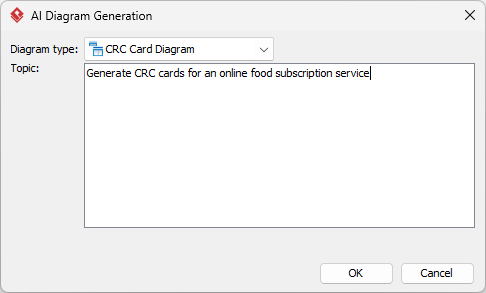
- Execute: Hit OK to begin the automated modeling process.
- Review Results: The AI will instantly build the diagram for you.
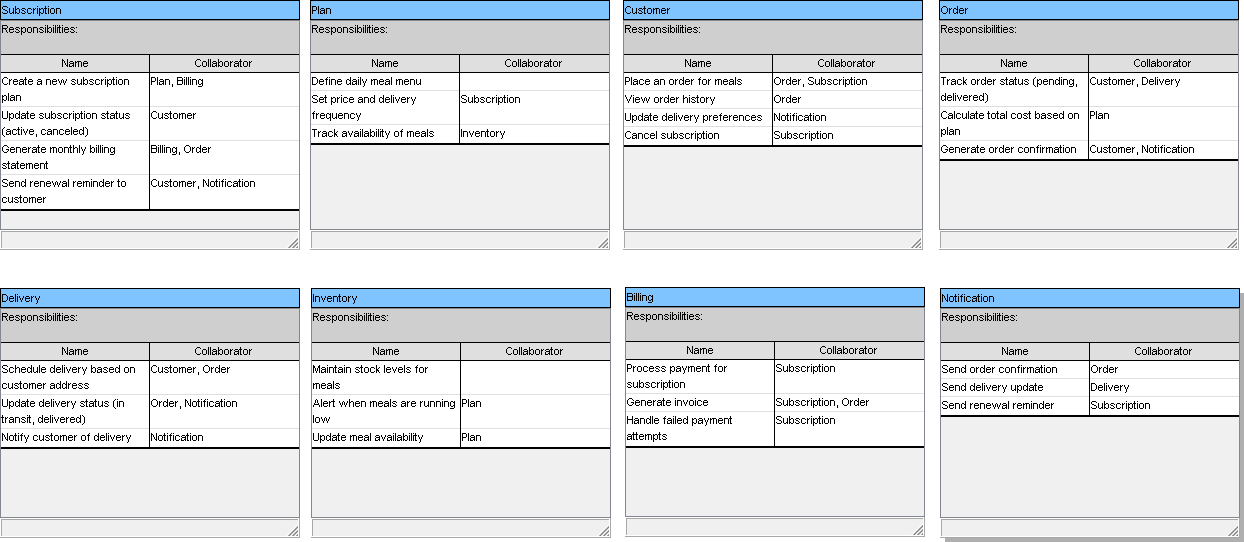
Working with Your New Diagram
Because the output is a native Visual Paradigm diagram rather than a static graphic, you have full control over the final product:
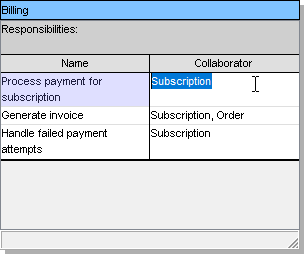
- Refine the Model: Modify any shapes, connection, or layout style using the standard editor tools.
-
Expand Content: Manually insert additional details or packages as needed.
- Share and Export: Save your work in various formats including PNG, SVG, or PDF for use in external documentation.
- Leverage Data: Utilize the diagram to produce source code or comprehensive technical reports.
Why Visual Paradigm Stands Out as the Top AI Diagram Tool
Plenty of tools claim to be the best AI UML diagram maker or online AI diagram editor. But most offer one-off generation—spit out a diagram and you’re done. Visual Paradigm goes further.
Our ecosystem provides:
- Widest diagram coverage, including native CRC Card support since early versions.
- Real traceability: Changes in one place ripple where needed.
- Multiple workflows: Chat for speed, Desktop for precision, docs for sharing, guided apps for structure.
- Seamless integration—no more switching between siloed apps.
Competitors might give you a pretty picture fast, but Visual Paradigm ensures your models stay professional, interconnected, and ready for code or reports. Since 2002, we’ve built tools for serious modelers—now supercharged with AI. You get time savings without sacrificing control or quality.
Ready to Try the Best AI-Powered CRC Card Diagram Solution?
Stop wrestling with manual CRC creation or half-baked AI outputs. Visual Paradigm gives you an end-to-end system: generate fast, refine deeply, collaborate easily, and scale confidently.
Head over to Visual Paradigm today, start with our free edition, and experience AI diagram generation that actually works for real projects. Whether you’re after an AI platform for visual modeling and diagramming or the ultimate CRC card tool, we’ve got you covered.
Try Visual Paradigm now—your designs will thank you.