


In the high-stakes world of software architecture and systems design, the distance between a conceptual breakthrough and a documented model often feels like an insurmountable chasm. Traditionally, developers and analysts spent hours meticulously dragging lifelines and drawing message arrows to represent system behavior. However, the emergence of the AI sequence diagram generator has fundamentally shifted this paradigm. Visual Paradigm has pioneered an ecosystem where natural language is the only prerequisite for generating sophisticated, industry-standard UML models. By leveraging advanced generative artificial intelligence, teams can now transform complex narratives into precise visual interaction flows in a matter of seconds.
Visual Paradigm does not merely offer a static drawing tool; it provides an intelligent modeling partner. Whether you are working within a robust desktop environment, utilizing a conversational AI chatbot, or managing an end-to-end requirement studio, the ability to visualize object interactions is now automated. This evolution ensures that the technical documentation remains as agile as the development process itself, allowing architects to focus on logic rather than layout.
Key Takeaways for Modern System Modelers
- Instant Visualization: Transform plain English descriptions into professional UML sequence diagrams immediately.
- Multi-Platform Accessibility: Access AI modeling via desktop software, web-based chatbots, or specialized modeling studios.
- Semantic Accuracy: The AI understands complex logic, including alternative paths (alt), loops, and optional fragments.
- Full Editability: Unlike static image generators, Visual Paradigm produces native, editable elements for further refinement.
- Streamlined Workflow: Bridge the gap between initial requirements analysis and technical design without manual drafting.
How Does a Conversational AI Chatbot Simplify Behavioral Modeling?
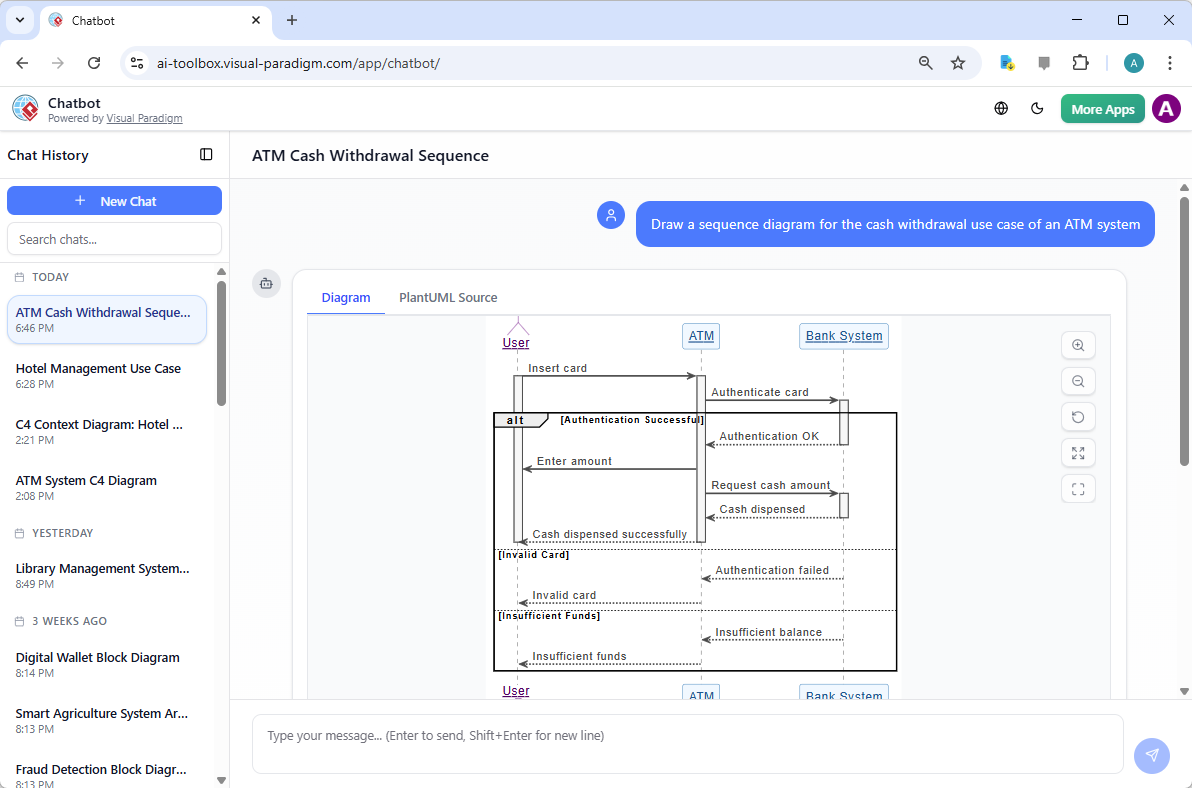
The first point of contact for many modern designers is the conversational interface. The Visual Paradigm AI Chatbot serves as a dedicated assistant that interprets user prompts to build comprehensive diagrams. Imagine describing a standard procedure, such as an ATM cash withdrawal, where multiple components like the User, the ATM hardware, and the Backend Bank System must synchronize perfectly. Instead of manually mapping these connections, you simply ask the chatbot to “Draw a sequence diagram for the cash withdrawal use case.”
The AI processes this request by identifying the primary actors and the sequence of messages required to fulfill the transaction. It handles the nuances of authentication, amount validation, and error handling with remarkable precision. The resulting model is not just a picture; it is a structured representation of logic that includes combined fragments to show what happens when a card is invalid or funds are insufficient. This conversational approach eliminates the “blank canvas” syndrome, providing a sophisticated starting point for any project.
Can Natural Language Generate Precise UML Models in Desktop Applications?
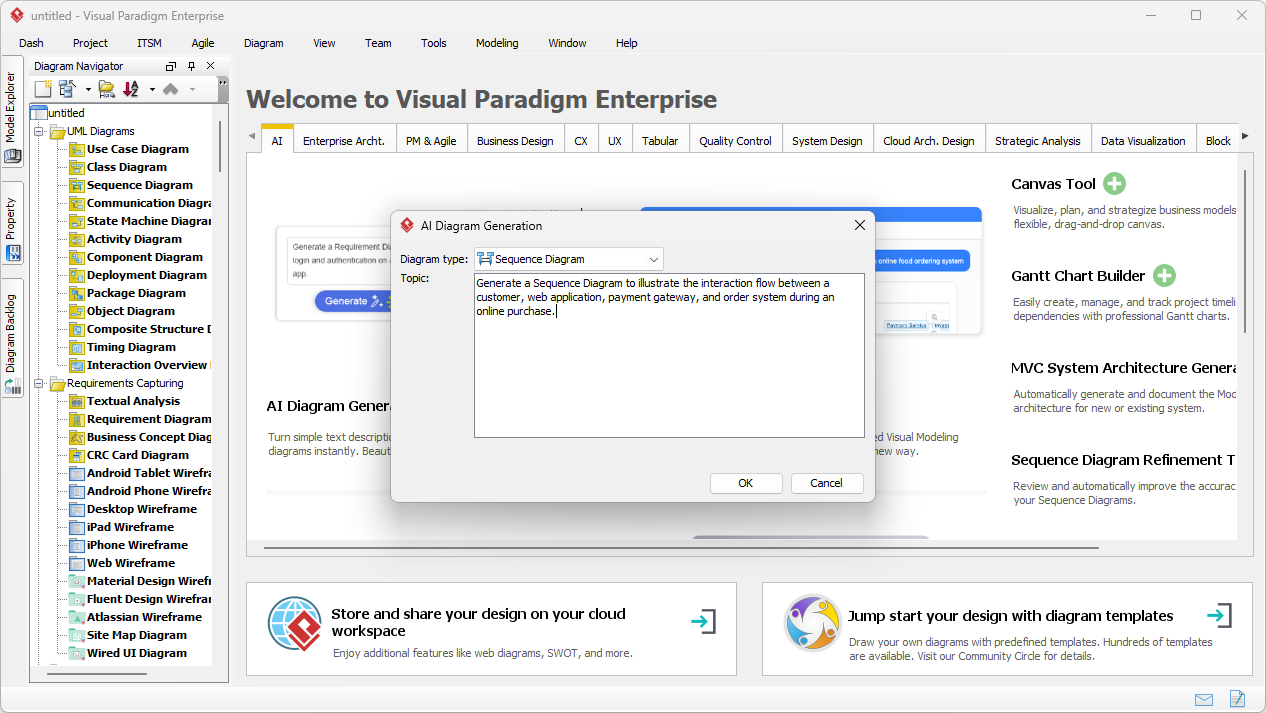
For enterprise architects who require a more robust environment, the Visual Paradigm Desktop application integrates the AI sequence diagram generator directly into the professional modeling suite. This feature is particularly powerful for documenting intricate scenarios like an online purchase flow. By navigating to the AI Diagram Generation tool, users encounter a streamlined interface where they can select the “Sequence Diagram” type and input a detailed topic. This process feels akin to explaining a workflow to a senior colleague—the software listens, understands, and then executes the visual drafting.
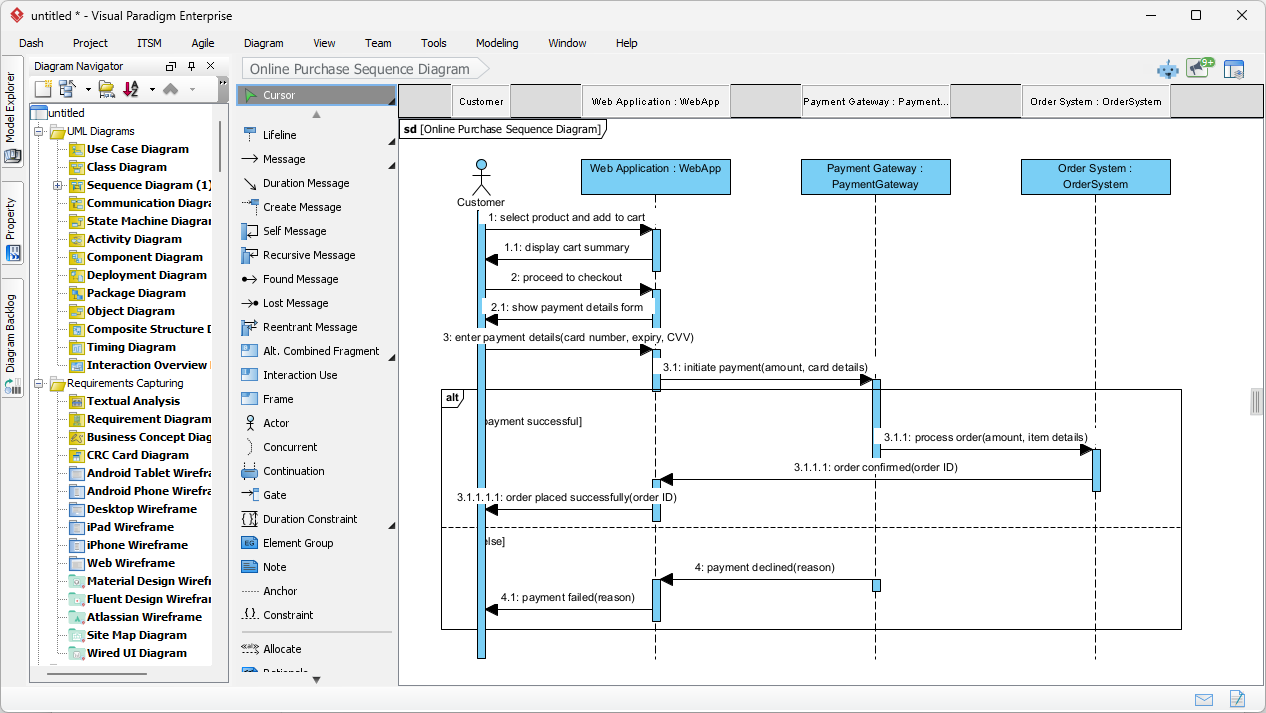
Consider a scenario where a customer interacts with a web application, which then communicates with a payment gateway and an order system. Providing this description in the input window allows the AI to infer the necessary lifelines and the chronological order of messages. This method ensures that the architectural vision is captured with high fidelity before a single line of code is written, facilitating better communication between stakeholders and the technical team.
Once the “OK” button is clicked, the magic of automated modeling unfolds. The desktop application produces a fully rendered, native sequence diagram. The beauty of this output lies in its organization: lifelines are logically spaced, activation bars are accurately aligned to show the duration of processes, and return messages are correctly formatted as dashed lines. For an online purchase, the AI might automatically generate an ‘alt’ fragment to distinguish between a “payment successful” path and a “payment failed” path. This level of detail typically represents about 80% of the modeling effort, leaving the architect to provide only the final 20% of specific technical refinement.
This automated layout is a significant productivity booster. In a professional setting, time spent adjusting the pixel-perfect alignment of arrows is time diverted from solving core business problems. With the AI sequence diagram generator, the layout is optimized from the outset, adhering to strict UML semantics while remaining entirely flexible. Designers can reorder messages or add notes manually, ensuring the final document meets the exact needs of the development sprint.
How Does Use Case Modeling Studio Bridge Requirements and Interaction Design?
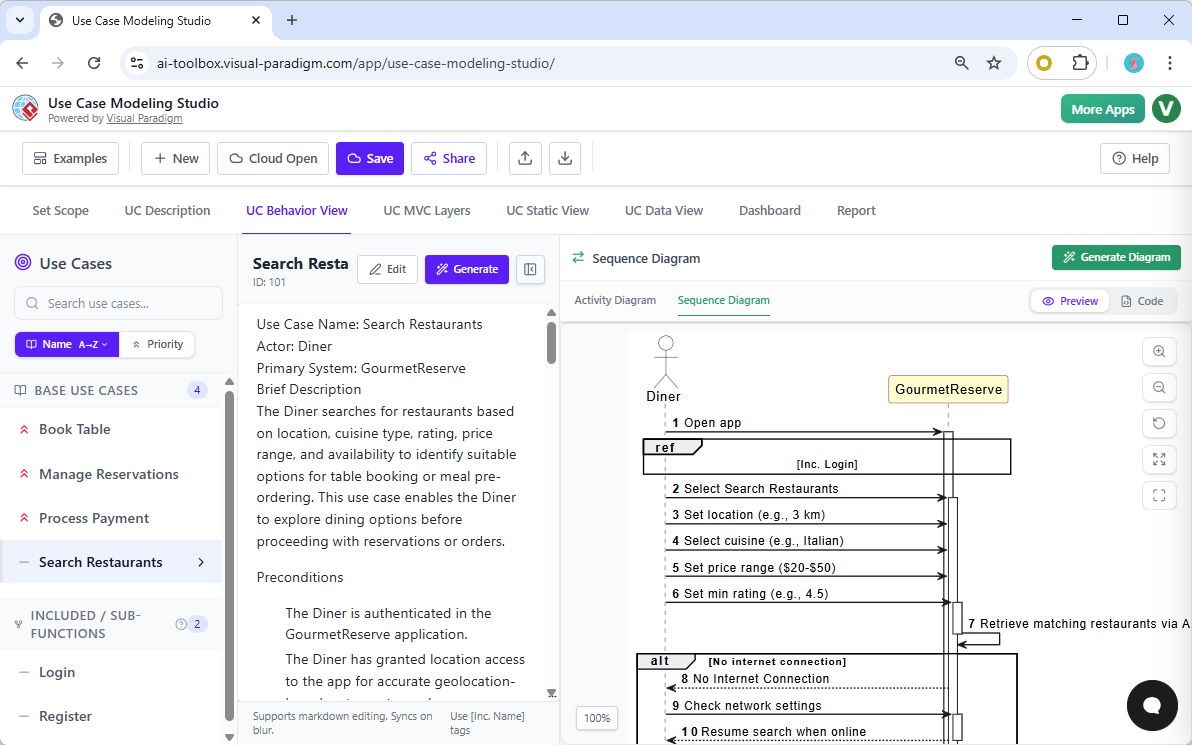
Beyond isolated diagrams, Visual Paradigm offers the Use Case Modeling Studio—a specialized web application designed for comprehensive requirements analysis. Within this environment, the “UC Behavior View” acts as the connective tissue between a use case description and its technical implementation. When a business analyst defines a use case, such as “Search Restaurants,” the studio allows them to generate an associated sequence diagram with a single click. This ensures that the behavioral model is always synchronized with the functional requirements.
The AI within the studio analyzes the textual description of the use case—including preconditions and flow of events—to construct the diagram. It identifies the actors involved (e.g., a Diner) and the system components (e.g., the GourmetReserve app). If the description mentions that a diner must log in, the AI might even suggest or include a reference fragment (ref) to a separate login sequence. This holistic approach ensures that no detail is lost in translation as a project moves from the requirement phase to the design phase.
Furthermore, the Use Case Modeling Studio simplifies the complexity of MVC (Model-View-Controller) architectures. By identifying the objects within the narrative, the AI can generate MVC sequence diagrams that illustrate exactly how data flows from the user interface to the backend controllers and database models. This serves as a vital blueprint for developers, clarifying the responsibilities of each software component and reducing the likelihood of architectural debt during implementation.
Conclusion: The Future of Modeling is Intelligent and Automated
The transition from manual drafting to AI-assisted modeling represents one of the most significant leaps in software engineering productivity. By utilizing an AI sequence diagram generator, organizations can ensure that their technical documentation is both accurate and comprehensive without sacrificing valuable development time. Visual Paradigm’s suite of tools—from the conversational Chatbot and the powerful Desktop application to the integrated Use Case Modeling Studio—provides a versatile toolkit for any professional environment. These tools do not replace the architect; they empower them, handling the repetitive tasks of layout and syntax so that human creativity can remain focused on innovation and system integrity.
Whether you are a student learning the ropes of UML or a seasoned enterprise architect managing global systems, the integration of AI into your workflow is no longer a luxury—it is a competitive necessity. The precision, speed, and clarity offered by Visual Paradigm’s AI ecosystem transform the way we think about, design, and document the digital world. It is time to move beyond the limitations of manual drawing and embrace the era of intelligent modeling.
Ready to Revolutionize Your Design Workflow?
Experience the power of professional AI-powered visual modeling today. Transform your ideas into production-ready diagrams with unparalleled speed and accuracy. You can begin your journey by downloading the full desktop suite or exploring our specialized web-based tools.
- To access the most robust modeling environment on your computer, Download Visual Paradigm Desktop and explore the AI Diagram Generation features.
- To streamline your requirements and behavioral modeling in the cloud, Try the Use Case Modeling Studio Now.
Related Links
- AI-Powered Sequence Diagram Refinement in Visual Paradigm: Discover how Visual Paradigm’s AI tool transforms use-case descriptions into precise and professional sequence diagrams with minimal manual effort.
- Mastering Sequence Diagrams with Visual Paradigm: AI Chatbot Tutorial: A beginner-friendly tutorial using Visual Paradigm to create sequence diagrams, illustrated through a real-world e-commerce chatbot use case.
- Visual Paradigm – AI-Powered UML Sequence Diagrams: Learn how to generate UML sequence diagrams instantly using AI within Visual Paradigm’s advanced modeling suite.
- AI-Powered Sequence Diagram Refinement Tool | Visual Paradigm: Discover how Visual Paradigm’s AI Sequence Diagram Refinement Tool enhances UML modeling by automatically improving and optimizing sequence diagrams with intelligent suggestions.
- Comprehensive Tutorial: Using the AI Sequence Diagram Refinement Tool: A step-by-step guide on leveraging the AI Sequence Diagram Refinement Tool to enhance diagram accuracy, clarity, and design consistency.
- Simplify Complex Workflows with Visual Paradigm AI Sequence Diagram Tool: Explore how Visual Paradigm’s AI-enhanced sequence diagram tool simplifies the modeling of complex system interactions and workflows.
- AI Sequence Diagram Refinement Tool | Visual Paradigm: Use AI to automatically refine and optimize your sequence diagrams for better readability, correctness, and consistency.
- Beginner’s Tutorial: Create Your First Professional Sequence Diagram in Minutes: A beginner-friendly guide to generating professional sequence diagrams quickly using Visual Paradigm’s AI chatbot feature.
- From Simple to Sophisticated: AI-Powered Sequence Diagram Refinement Tool: Explore how Visual Paradigm’s AI-powered tool evolves simple diagrams into sophisticated, accurate models with minimal effort.
- Refining Sequence Diagrams with AI: A Smarter Way to Design Systems: Learn how AI enhances the design process by intelligently refining sequence diagrams for better system modeling and clarity.
- AI Sequence Diagram Example: Video Streaming Playback Initiation | Visual Paradigm: It started with a straightforward prompt: “Create a sequence diagram that explains how a video streaming platform starts playback when a user clicks play.” The Visual Paradigm AI Chatbot didn’t just generate a diagram—it acted as a modeling partner, interpreting intent, anticipating needs, and refining logic in real time.