


Modeling system behavior used to be a manual and time-consuming chore for software architects. Today, the AI State Machine Diagram Generator by Visual Paradigm transforms this entire process. By simply describing an object’s lifecycle in plain English, you can create professional-grade UML models in seconds. Whether you are managing an e-commerce order flow or a technical support ticket system, this tool interprets your logic with high precision. It bridges the gap between conceptual requirements and technical visualization seamlessly. This article explores how Visual Paradigm’s AI-powered ecosystem simplifies complex behavioral modeling for developers and business analysts alike, ensuring project clarity from the very start.
Key Takeaways for Efficient Modeling
- Instant Generation: Convert natural language descriptions into fully editable UML state machines immediately.
- Standard Compliance: Ensure your diagrams follow official UML notation for states, transitions, and guards.
- Integrated Ecosystem: Access AI tools through both a robust desktop application and a conversational web chatbot.
- Refinement Ready: Use AI-generated structures as an 80% foundation, then fine-tune details manually.
- Versatile Application: Ideal for modeling order lifecycles, UI logic, business workflows, and reactive protocols.
The Power of AI-Driven State Modeling
Visual Paradigm has evolved into a comprehensive AI-powered visual modeling ecosystem. It integrates generative AI across its desktop application and specialized web assistants. This technology accelerates diagram creation, database design, and software architecture visualization. Users no longer need to start with a blank canvas when designing complex systems. Instead, they provide a prompt, and the professional AI diagram software handles the initial layout and logic mapping. This approach is particularly effective for state machine diagrams. These diagrams represent how an object changes over time based on specific events or triggers. By leveraging AI-powered visual modeling, teams can focus on refining logic rather than drawing shapes.
The process begins with a clear description of the system behavior. In the Visual Paradigm desktop environment, a dedicated interface allows you to input your requirements directly. You might describe an online order system where a state moves from “Pending” to “Paid” upon a successful transaction. The AI analyzes these entities and identifies the necessary relationships. It detects initial states, final states, and the transitions that connect them. This eliminates the need to manually drag and drop every rounded rectangle or arrow. It provides a structured starting point that adheres to technical standards without the usual manual effort.
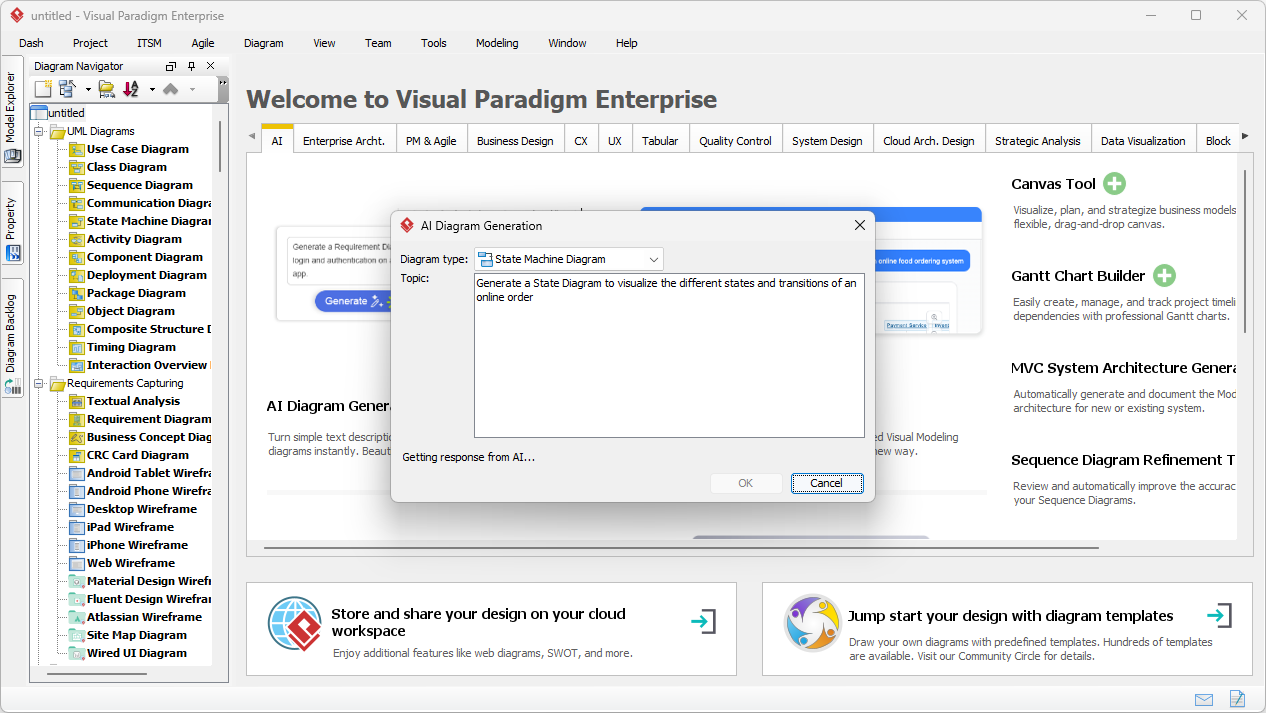
From Text to Professional UML Diagrams
Once you provide the description, the best AI state machine maker executes the generation process swiftly. The results are visible immediately within the diagram editor. For example, a description of an online order might produce states like “Order Created,” “Order Pending,” and “Order Shipped.” The AI understands the logical flow, ensuring that “Cancelled” states are reachable from the correct points in the lifecycle. This intelligent transition detection is a core benefit of using Visual Paradigm’s innovative tools. It solves the difficulty of deciding when and how to use guards or events. The resulting diagram is not just a static image but a native, editable model.
The output is logically arranged with an optimized layout. This removes the frustration of manual repositioning and crossing lines. Software developers and architects find this feature highly valuable for designing reactive systems or complex object lifecycles. Business analysts also benefit by using it to model approval workflows or order statuses. Because the diagram is native to the project, you can easily link it to class diagrams or sequence diagrams. This ensures a consistent design across your entire software development lifecycle. The transition from a text prompt to a structured visual model feels like a high-quality human-AI collaboration.
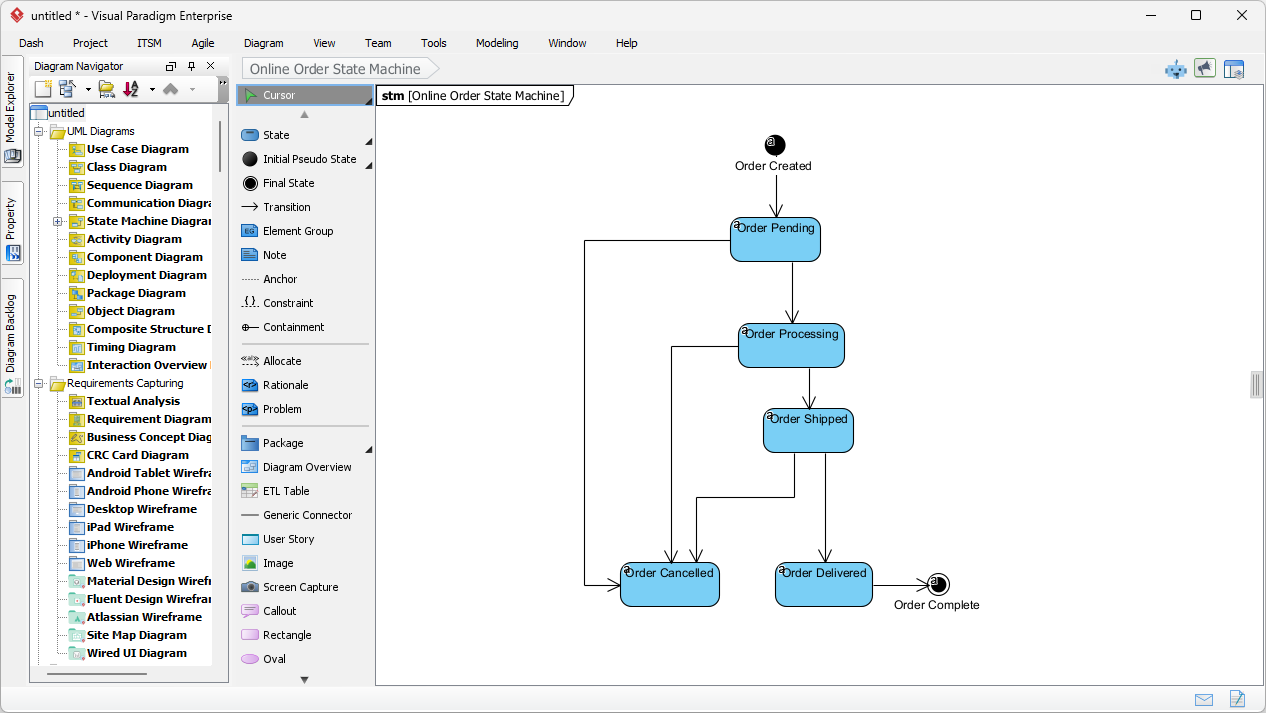
Conversational Modeling with the AI Chatbot
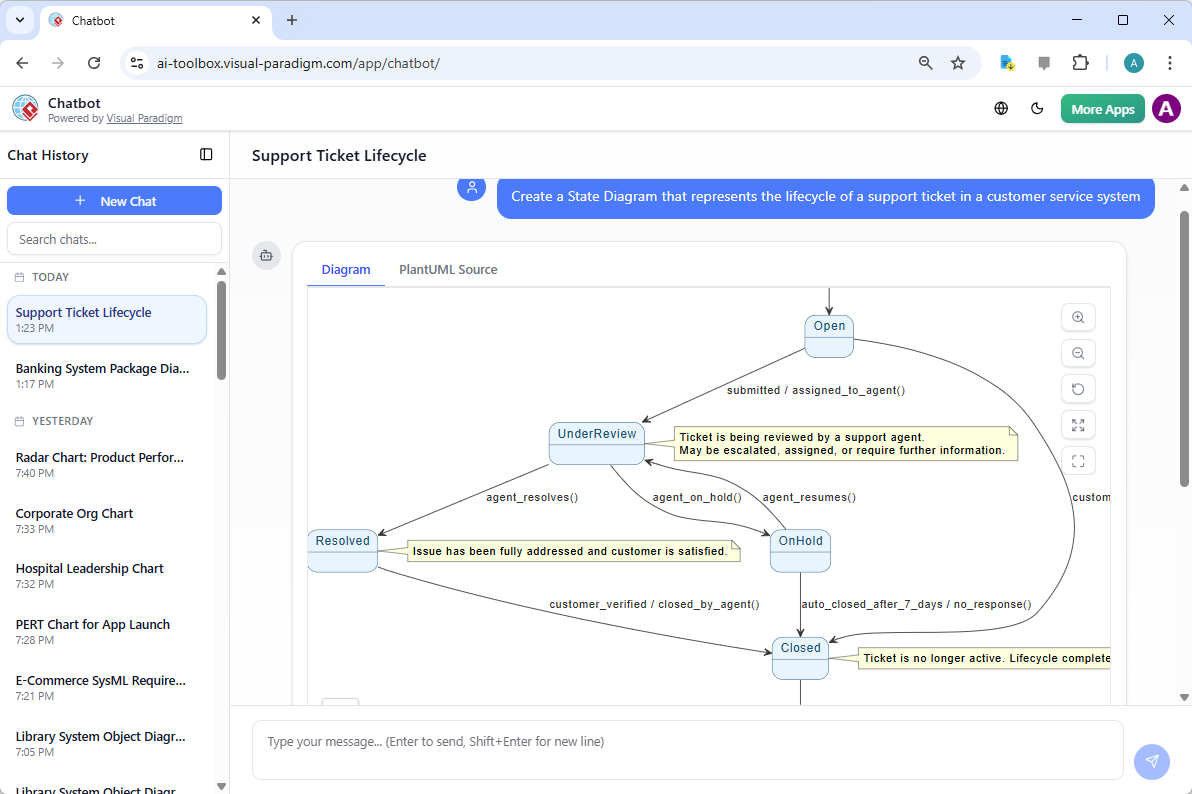
Beyond the desktop application, Visual Paradigm offers a leading AI-powered visual modeling chatbot. This tool is accessible via the web and provides a conversational way to generate diagrams. You simply type a message, such as “Create a State Diagram that represents the lifecycle of a support ticket.” The chatbot interprets the request and produces a complete diagram within the chat interface. It can handle various standards, including UML, SysML, and ArchiMate. This is perfect for brainstorming sessions or quick prototyping when you are away from your primary workstation. It turns plain English prompts into standard-compliant visuals almost instantly.
The chatbot interface is intuitive and requires no prior modeling knowledge. It displays the diagram alongside the underlying source code for those who need technical depth. For a support ticket lifecycle, it might identify states such as “Open,” “Under Review,” “On Hold,” and “Resolved.” It even suggests relevant events like “agent_resolves()” or “customer_verified.” This level of detail helps technical leads and product owners validate requirements quickly. You can interact with the chatbot to refine the diagram or export it to the desktop app for teamwork. It is an easy-to-use AI diagram tool that removes the barriers to entry for professional modeling.
Core Workflows for AI State Machine Generation
To maximize efficiency, users should follow established workflows. These steps ensure that the professional AI state machine editor produces the most accurate results possible. First, always provide a detailed description of the entity’s behavior. Mention specific states, triggers, and any conditions that must be met. For instance, explaining that an order only moves to “Processing” if stock is available allows the AI to insert a “guard” condition. Once the initial diagram is generated, review the structure to ensure it matches your business rules. You can then use Visual Paradigm’s advanced tools to add entry/exit actions or activities to each state.
Another powerful workflow involves generating lifecycle variations. You can modify your description to include different edge cases or exception paths. This allows you to explore multiple design options in minutes. After refining the model, the professional diagramming software allows for flexible exporting. You can save your state machine as a high-resolution image, a PDF, or include it in a technical report. This makes it simple to share your AI-created models with stakeholders or team members. The integration into the broader Visual Paradigm ecosystem means your state models can even drive code generation or system simulations later in the project.
Understanding Key State Machine Concepts
For those new to the field, it is helpful to understand the basic building blocks of these diagrams. The AI State Machine Diagram Generator uses these terms to build your models:
- State: A condition or situation in the life of an object (e.g., “Order Shipped”).
- Transition: An arrow showing the movement from one state to another.
- Event: The trigger that causes a transition to happen (e.g., “Payment Received”).
- Guard: A condition that must be true for the transition to occur (e.g., “[Stock > 0]”).
- Initial State: The starting point of the lifecycle, usually represented by a solid circle.
- Final State: The end of the process, represented by a circle with a dot inside.
Conclusion
The AI State Machine Diagram Generator by Visual Paradigm is a game-changer for anyone involved in system design. It eliminates the manual labor of drawing and allows you to focus on the logic of your system behavior. By combining AI-powered visual modeling with a robust desktop environment and a conversational chatbot, Visual Paradigm provides a flexible solution for any workflow. You can transform simple text into complex, professional UML diagrams in seconds. This speed and accuracy improve communication within teams and ensure that designs are validated early. Whether you are a student or a senior architect, these tools make state modeling accessible and efficient.
Ready to experience the future of visual modeling? You can start building your own professional diagrams today. Download the software and see how the AI-powered diagramming features can supercharge your productivity.
Experience the best AI diagram software for yourself: Download Visual Paradigm Now
Related Links
The integration of artificial intelligence into state machine modeling allows developers to bridge the gap between high-level behavioral requirements and executable system logic. The following resources provide insights into AI-powered chatbot assistants that generate diagrams from natural language, tools for automating code generation from state models, and comprehensive guides for distinguishing state machines from other behavioral diagrams like activity diagrams.
- AI-Powered UML Chatbot State Diagrams: This article explores how artificial intelligence improves the creation and interpretation of UML state diagrams specifically for chatbot systems.
- Definitive Guide to UML State Machine Diagrams with AI: This resource provides a detailed guide on using AI-enhanced tools to model object behavior with UML state machine diagrams.
- Mastering State Diagrams with Visual Paradigm AI: A Guide for Automated Toll Systems: This guide demonstrates using AI-enhanced state diagrams to model and automate complex behaviors within toll system software.
- Interactive State Machine Diagram Tool: This web-based tool allows for the creation and editing of state machine diagrams through real-time collaboration and generative AI support.
- Visual Paradigm – UML State Machine Diagram Tool: This describes a comprehensive online interface for creating, editing, and exporting detailed UML state machine diagrams via a conversational assistant.
- What is a State Machine Diagram? A Comprehensive Guide to UML State Diagrams: This resource provides an in-depth overview of state machine diagrams, detailing their components and real-world applications in system design.
- Generating Source Code from State Machines in Visual Paradigm: This tutorial teaches users how to generate source code directly from state machine diagrams to implement complex state-driven logic efficiently.
- State Machine Diagram Software Features – Visual Paradigm: This overview highlights the specific capabilities of the software for modeling complex state transitions and dynamic system behavior.
- State Machine vs Activity Diagram: Key Differences: This guide clarifies the distinct roles and applications of state machines compared to activity diagrams in modeling system behavior.
- Free State Machine Diagram Templates for Visual Paradigm: This collection offers professional state machine templates that can be used to efficiently model various system behaviors and state transitions.