


Creating a clear and comprehensive software architecture is a critical first step for any complex project. The AI-Powered C4 PlantUML Studio by Visual Paradigm offers a powerful, guided workflow to transform a simple problem statement into a full, multi-layered system design. This case study demonstrates how this tool can be used to design a Warehouse Management System, from the initial problem definition to a complete deployment architecture, all with the help of AI. It’s an excellent example of how modern tools can simplify complex tasks and accelerate the software design process.
For software architects and developers, the challenge lies in moving from a vague idea to a structured, communicable design. The AI-Powered C4 PlantUML Studio addresses this by providing a step-by-step, guided process that leverages AI to generate the initial diagrams. This allows users to focus on the design’s logic and refinement rather than getting bogged down in syntax. The studio’s core strength is its ability to generate a complete, context-aware C4 model based on a simple text input, making it an ideal tool for both professionals and students.
Quick summary
- Use the AI-Powered C4 PlantUML Studio to create a structured software architecture for a Warehouse Management System.
- Start with a clear Problem Statement to guide the AI.
- Generate diagrams step-by-step: Context, Container, Component, and supporting views.
- Refine the generated PlantUML code manually for precision.
- Use the Live Preview to see changes instantly.
- Save your project to the cloud for easy access and sharing.
Step 1: Defining the Problem Statement
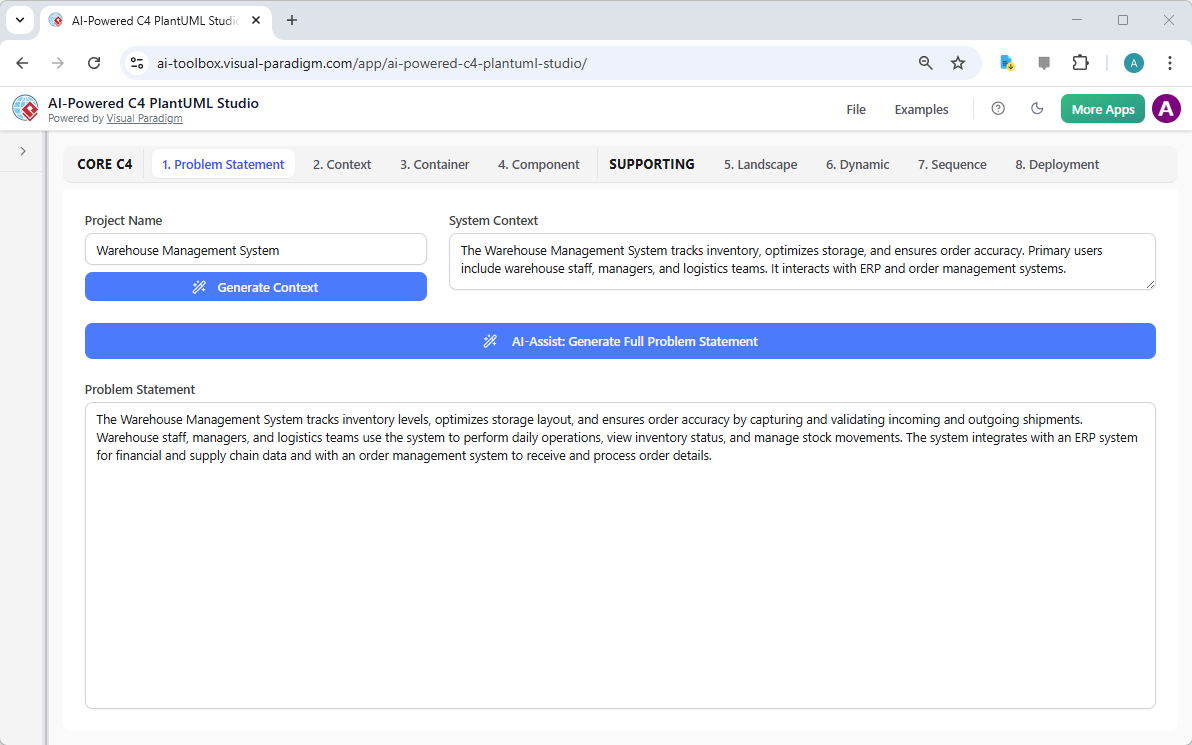
The journey begins with a clear problem statement. In this case, the user has named the project “Warehouse Management System” and used the AI-assist feature to generate a full description. The generated text provides a solid foundation for the entire model, detailing the system’s purpose, its primary users (warehouse staff, managers, logistics teams), and its key integrations (ERP, order management). This step is crucial because the AI uses this text to generate all subsequent diagrams, ensuring they are contextually relevant.
Key takeaway: A well-defined problem statement is the cornerstone of a successful architecture. The AI-Powered C4 PlantUML Studio makes this step easy by allowing you to generate a detailed description from a simple project name.
Step 2: Generating the System Context
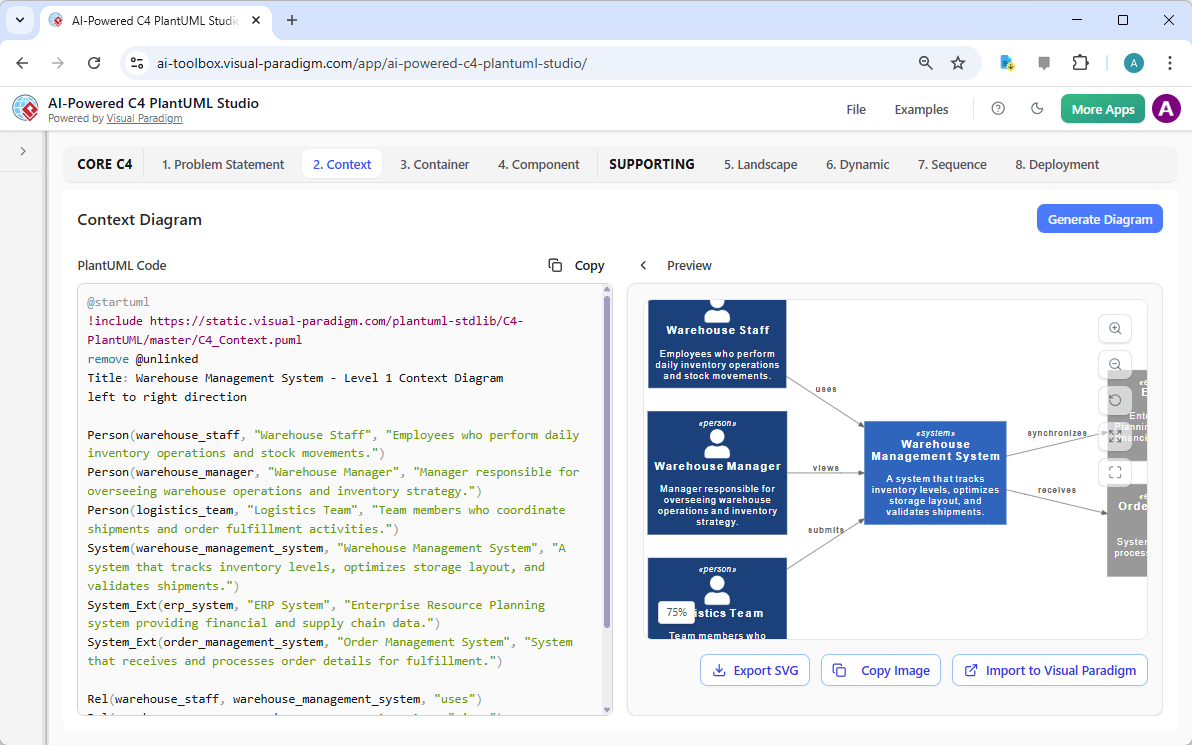
After defining the problem, the next logical step is to understand the system’s boundaries. The Context Diagram (Step 2) visualizes the system as a single entity and its interactions with external actors and systems. In this example, the AI has generated a diagram showing the “Warehouse Management System” interacting with “Warehouse Staff,” “Warehouse Manager,” “Logistics Team,” and external systems like “ERP System” and “Order Management System.” This high-level view is essential for aligning stakeholders and ensuring everyone understands the system’s scope.
With the AI-Powered C4 PlantUML Studio, generating this diagram is a simple click. The AI reads the problem statement and creates the PlantUML code and a visual preview simultaneously. The split-screen editor allows you to see the code and the diagram side-by-side, making it easy to understand how the text translates into a visual model.
Step 3: Creating the Container Diagram
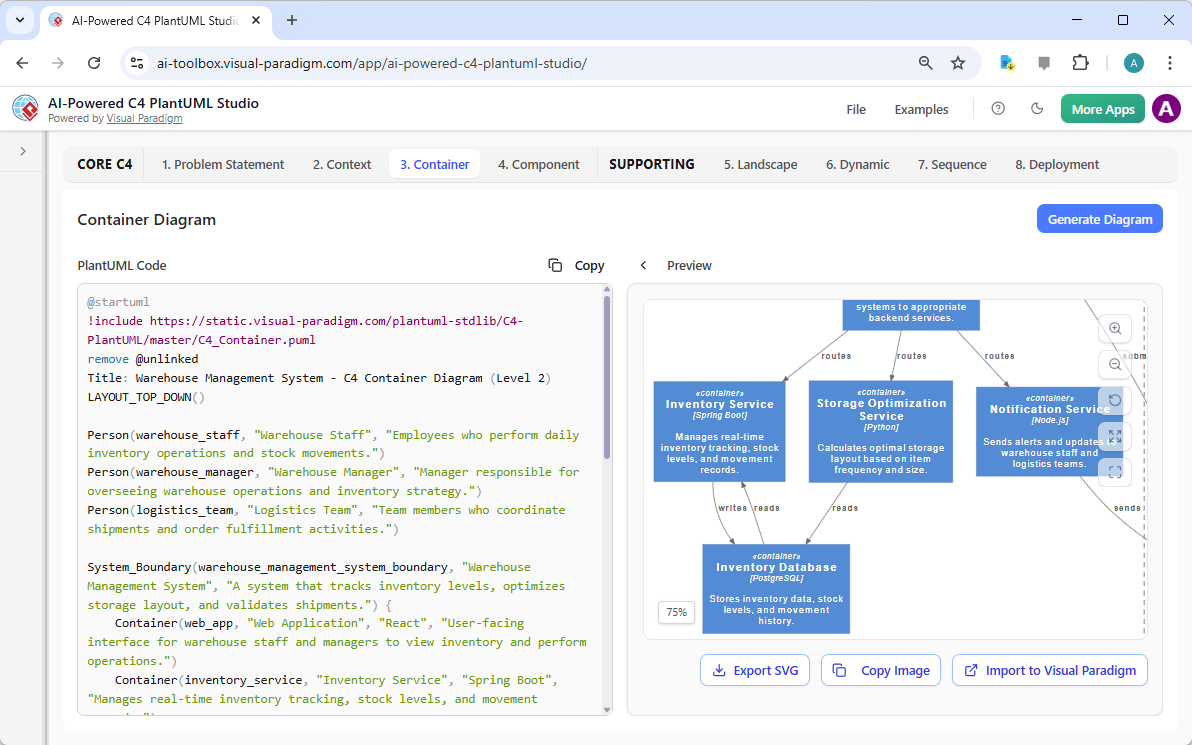
Now that the system’s context is established, we can zoom in. The Container Diagram (Step 3) breaks down the system into its major technical components, such as web applications, APIs, and databases. The AI has generated a diagram for the “Warehouse Management System” that includes a “Web Application” (React), a “Storage Optimization Service” (Spring Boot), and an “Inventory Database” (PostgreSQL). This level of detail helps developers understand the technology stack and the communication pathways between different parts of the system.
The studio’s guided workflow ensures a logical progression from context to container. The AI uses the information from the previous steps to generate a more detailed diagram. You can then refine the generated code in the editor, such as changing the description of a container or adjusting its relationship with other components.
Step 4: Detailing the Component Diagram
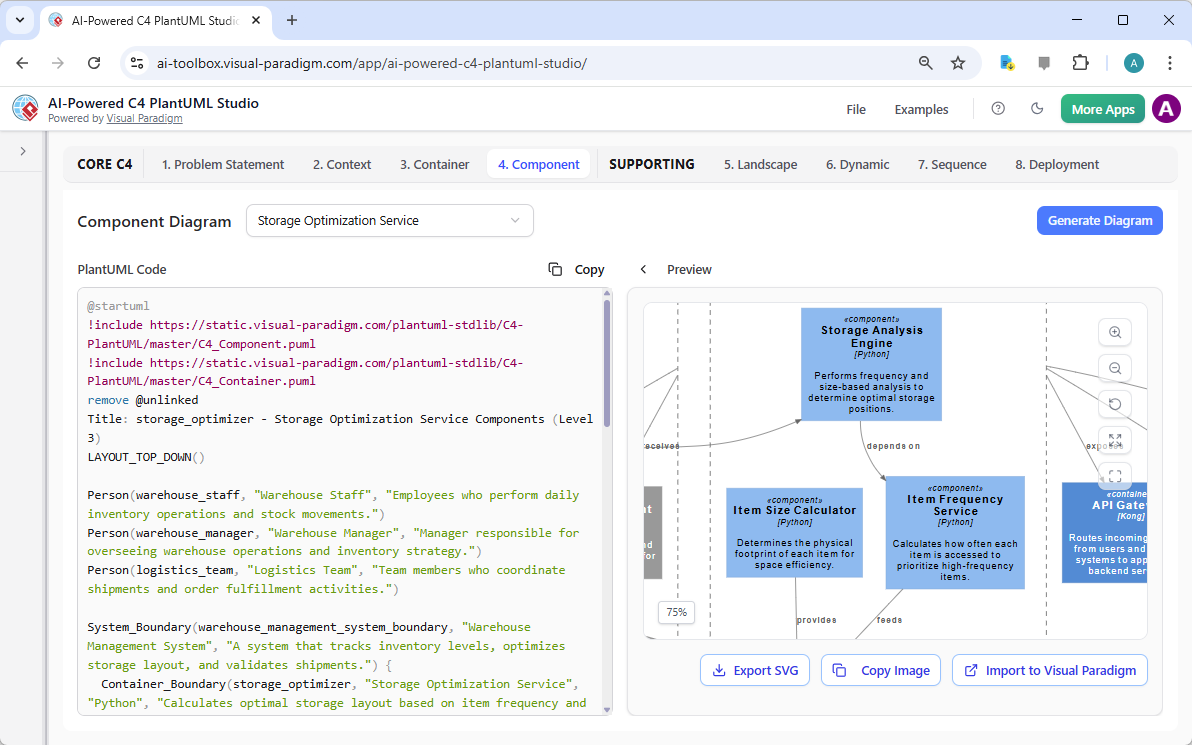
To gain even deeper insight, we move to the Component Diagram (Step 4). This diagram shows the internal structure of a specific container, in this case, the “Storage Optimization Service.” The AI has generated a diagram that includes components like “Storage Analysis Engine,” “Item Size Calculator,” and “Item Frequency Service,” each with a brief description of its function. This level of detail is invaluable for developers who need to understand the internal logic and dependencies of a specific module.
The AI-Powered C4 PlantUML Studio makes this process efficient. By selecting a container from the diagram, you can generate a component diagram that is tailored to that specific part of the system. The live preview allows you to instantly see the impact of any changes you make to the PlantUML code.
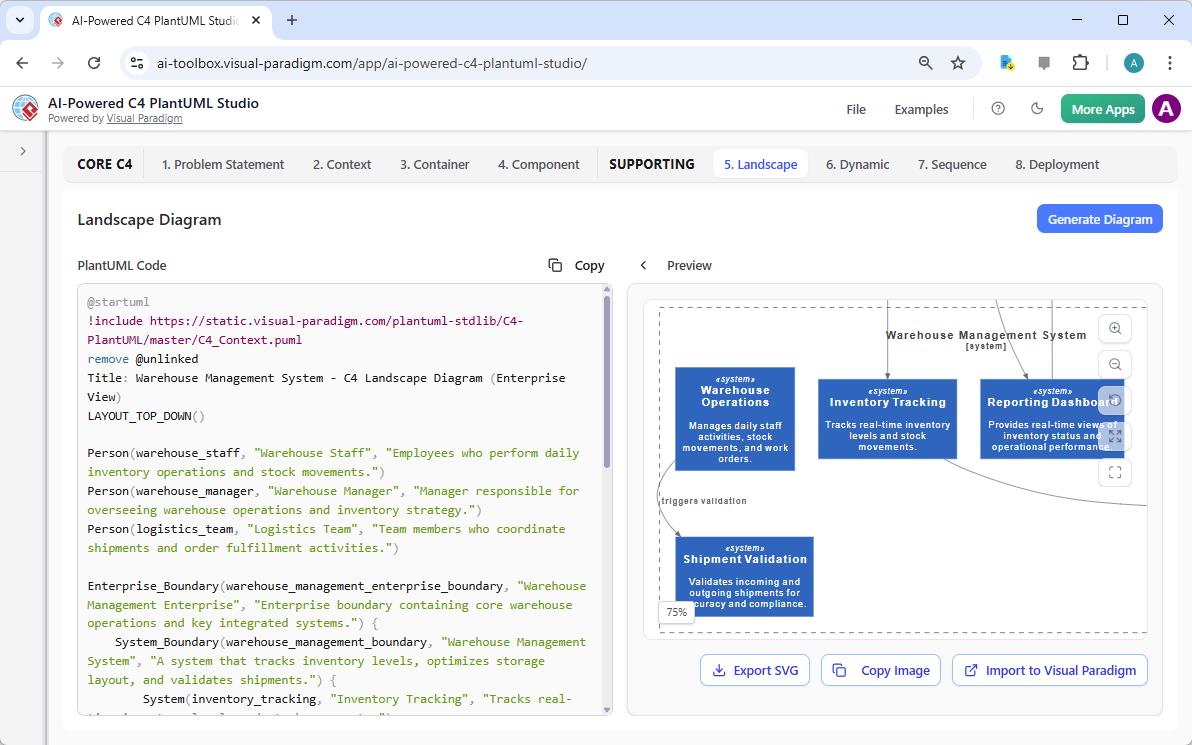
Step 5: Visualizing the Landscape
For a broader view, the Landscape Diagram (Step 5) shows how the main system fits into the larger enterprise environment. This diagram can include other systems, such as “Inventory Tracking” and “Reporting Dashboard,” that interact with the core system. The AI generates this diagram by synthesizing information from the previous steps, creating a holistic view of the software ecosystem.
This is a powerful feature for enterprise architects who need to understand the interdependencies between multiple systems. The AI-Powered C4 PlantUML Studio allows you to create these complex views with minimal effort, ensuring that your architecture is designed with the broader business context in mind.
Step 6: Mapping Dynamic Interactions
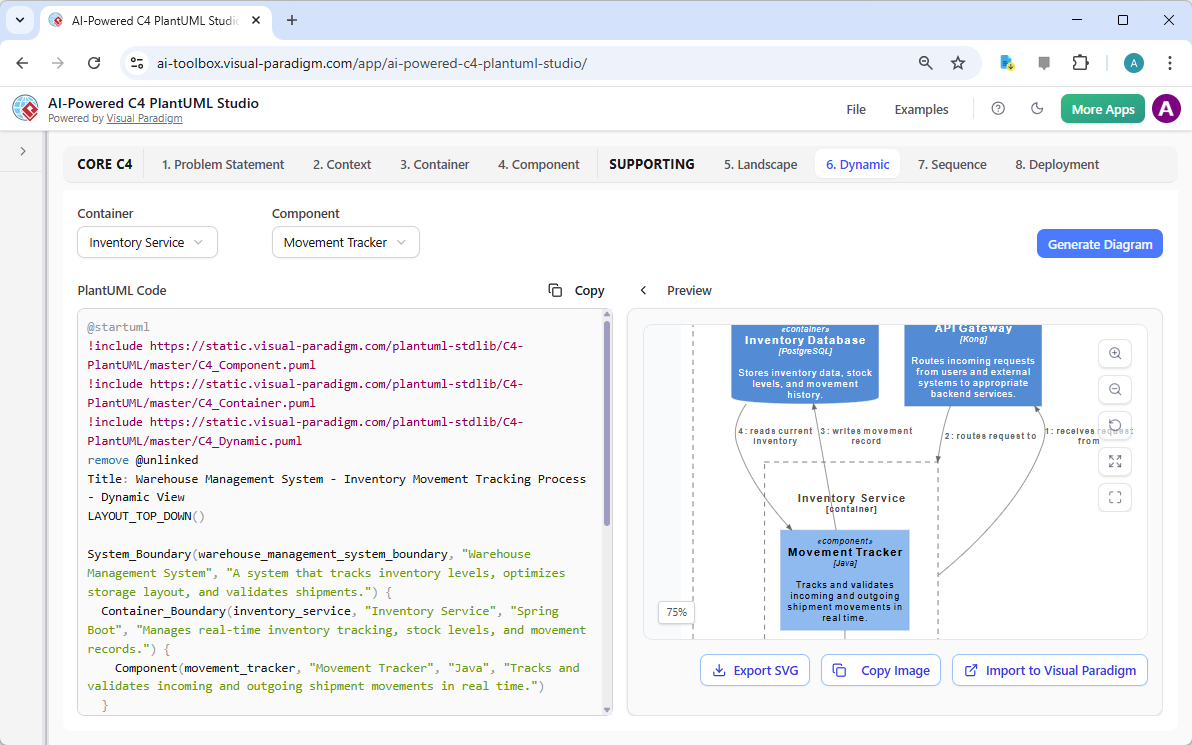
While the previous diagrams show the static structure of the system, the Dynamic Diagram (Step 6) illustrates how components interact over time. This is a sequence diagram that shows the flow of messages between the “Inventory Service” and the “Movement Tracker” component. The AI has generated a diagram that depicts the sequence of events, such as “initiates movement tracking” and “receives current inventory,” which is essential for understanding the system’s runtime behavior.
The AI-Powered C4 PlantUML Studio allows you to generate these dynamic views based on a selected container and component. This is particularly useful for documenting complex business processes and ensuring that the system’s design supports the required workflows.
Step 7: Documenting Sequence Flows
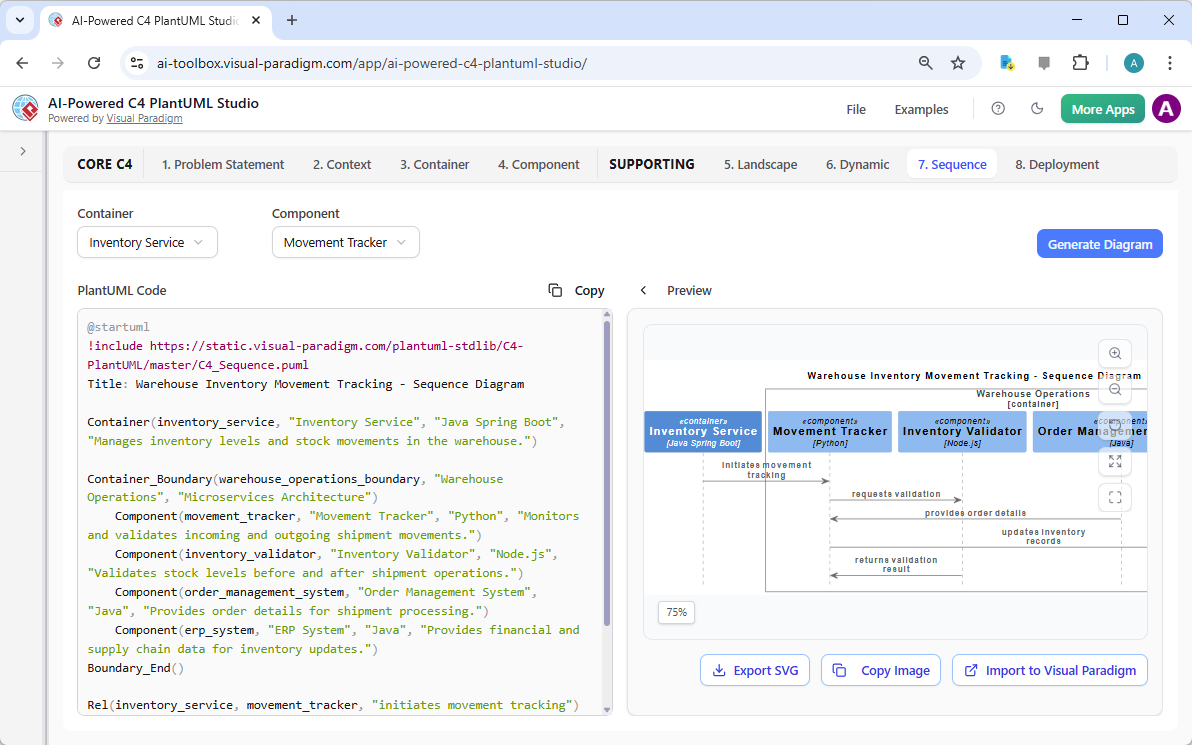
Another supporting diagram is the Sequence Diagram (Step 7), which provides a detailed, step-by-step view of a specific interaction. In this case, the diagram shows the sequence of events for “Warehouse Inventory Movement Tracking,” involving components like “Inventory Service,” “Movement Tracker,” and “Inventory Validator.” This level of detail is crucial for developers who need to implement the system’s logic correctly.
The AI-generated sequence diagram serves as a starting point, which can then be refined to capture the exact sequence of operations. The ability to generate such diagrams automatically saves significant time and reduces the risk of errors in documentation.
Step 8: Planning the Deployment
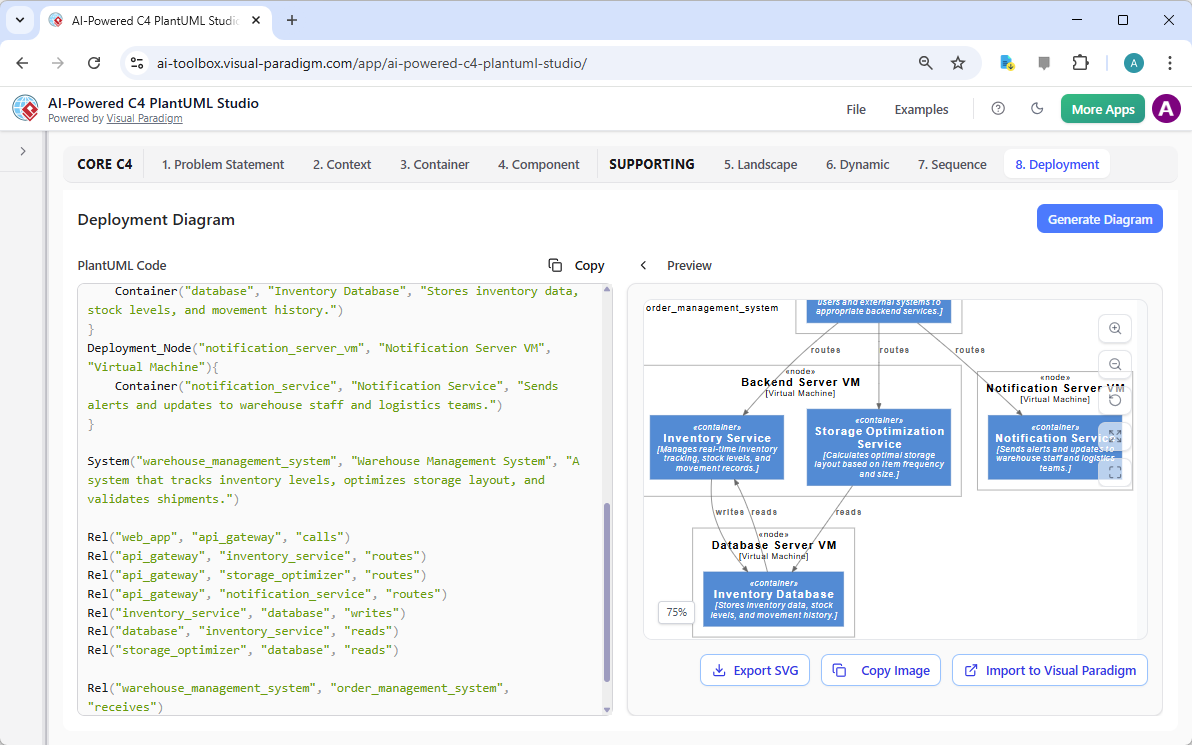
The final step in this case study is the Deployment Diagram (Step 8). This diagram shows how the software components are deployed on physical or virtual hardware. The AI has generated a diagram that includes “Backend Server VM,” “Database Server VM,” and “Notification Server VM,” showing the relationships between the software containers and the underlying infrastructure.
Creating a deployment diagram manually can be time-consuming and complex. The AI-Powered C4 PlantUML Studio automates this process, allowing you to generate a clear and accurate deployment plan based on your system’s architecture. This is essential for operations teams and DevOps engineers who need to understand the system’s infrastructure requirements.
Conclusion
This case study demonstrates the power of the AI-Powered C4 PlantUML Studio in creating a comprehensive software architecture. From the initial problem statement to the final deployment diagram, the tool provides a guided, AI-assisted workflow that simplifies the process of designing complex systems. It allows users to focus on the design’s logic and refinement rather than getting bogged down in syntax, making it an excellent tool for software architects, developers, and students alike.
The ability to generate accurate diagrams from a simple text description, combined with the live preview and manual editing capabilities, makes this studio a powerful solution for software design. By following the structured process, users can create a clear, communicable, and accurate model of their system that can be shared with stakeholders and used as a foundation for development.
Ready to create your own software architecture? Try the AI-Powered C4 PlantUML Studio today and experience the future of software design.
Related Links
The C4 model is a hierarchical software architecture technique used to visualize systems at four distinct levels of abstraction: Context, Containers, Components, and Code. Visual Paradigm offers specialized tools to create these models, including AI-driven automation through the C4-PlantUML Studio, which can transform natural language descriptions into layered architecture diagrams. These features are designed to streamline the documentation lifecycle, ensuring that complex system designs remain scalable, maintainable, and clear for both developers and stakeholders. Recent updates have introduced full C4 model support across desktop and cloud platforms, enabling teams to use AI chatbots to instantly generate and refine component diagrams for various system types.
- Beginner’s Guide to C4 Model Diagrams: A foundational step-by-step introduction to creating diagrams across all four C4 levels for effective communication.
- C4 Model Tool – Visualize Software Architecture with Ease: An overview of the dedicated toolset used to manage architectural models at multiple levels of abstraction.
- AI-Powered C4-PlantUML Studio Diagram Generator: Details on a tool that combines AI automation with PlantUML flexibility to build C4 diagrams from text.
- Leveraging AI C4 Studio for Streamlined Architecture Documentation: A guide focused on using AI to maintain clean and scalable documentation for modern software systems.
- C4 Model Templates – Ready-to-Use Designs: A library of professionally designed templates to help teams quickly visualize system designs during planning.
- Unveiling the Power of C4 Model: Simplifying Architecture Diagrams: An article exploring how cloud-based platforms simplify the creation of accurate C4 models.
- Visual Paradigm Full C4 Model Support Release Notes: Documentation on the latest features enabling comprehensive C4 diagram management in Visual Paradigm.
- A Comprehensive Guide to AI-Powered C4 PlantUML Studio: An exploration of how generative AI creates layered, reliable diagrams from natural language input.
- C4 Model AI Generator: Automating Lifecycle Management: A look at how AI chatbots automate the modeling lifecycle to provide consistent results for DevOps and cloud teams.
- The Ultimate Guide to C4-PlantUML Studio Design: A resource detailing how AI-driven automation enhances the clarity and flexibility of software architecture design.