


Planning a large-scale project, such as an international conference or a software launch, requires meticulous attention to task dependencies and timing. Manually drawing network diagrams and calculating critical paths is often a bottleneck for project managers. Utilizing the best AI PERT chart generator allows teams to transition from raw ideas to structured schedules in seconds. Visual Paradigm’s AI-powered visual modeling ecosystem provides a robust solution for this challenge, enabling professionals to convert natural language descriptions into professional, editable PERT charts that highlight the most efficient route to project completion.
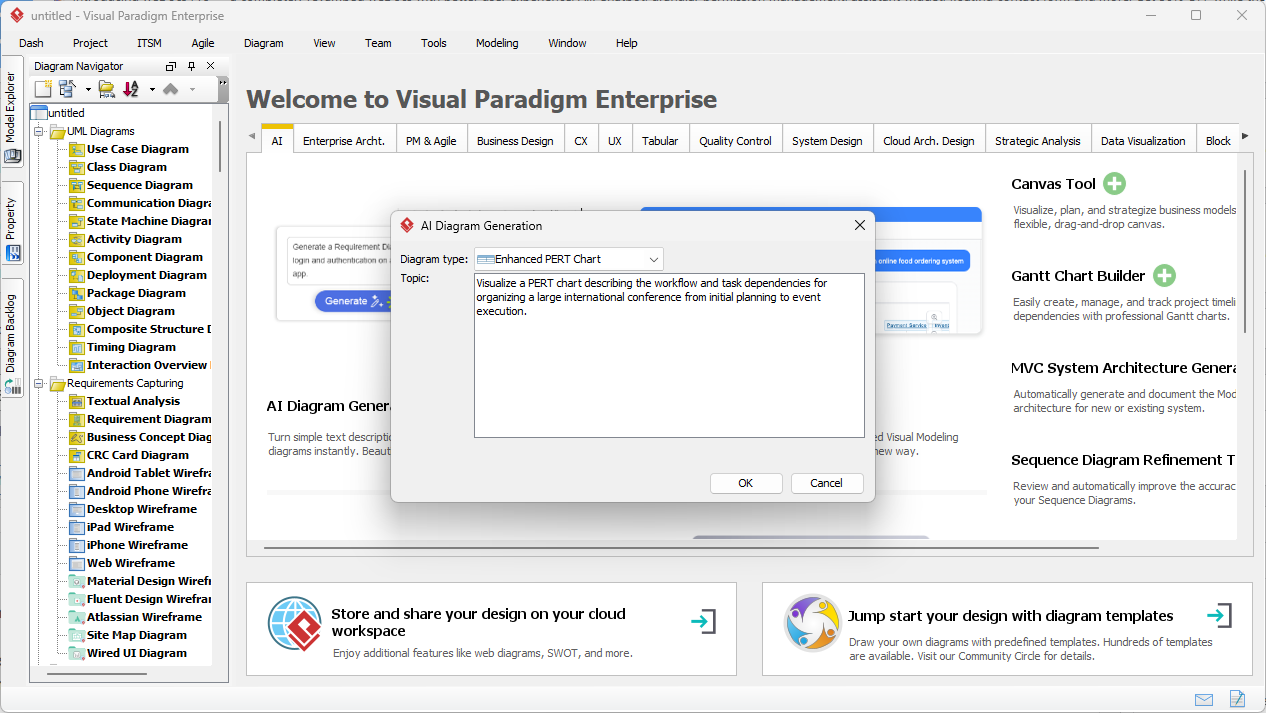
In a typical professional environment, the process begins with defining the scope. As seen in the Visual Paradigm Desktop interface, the AI Diagram Generation tool provides a streamlined prompt window. Here, a user can input a high-level description of a project—for instance, organizing an international conference from planning to execution. The AI analyzes the text to identify key milestones and the logic of the workflow, removing the need for manual node placement and connection.
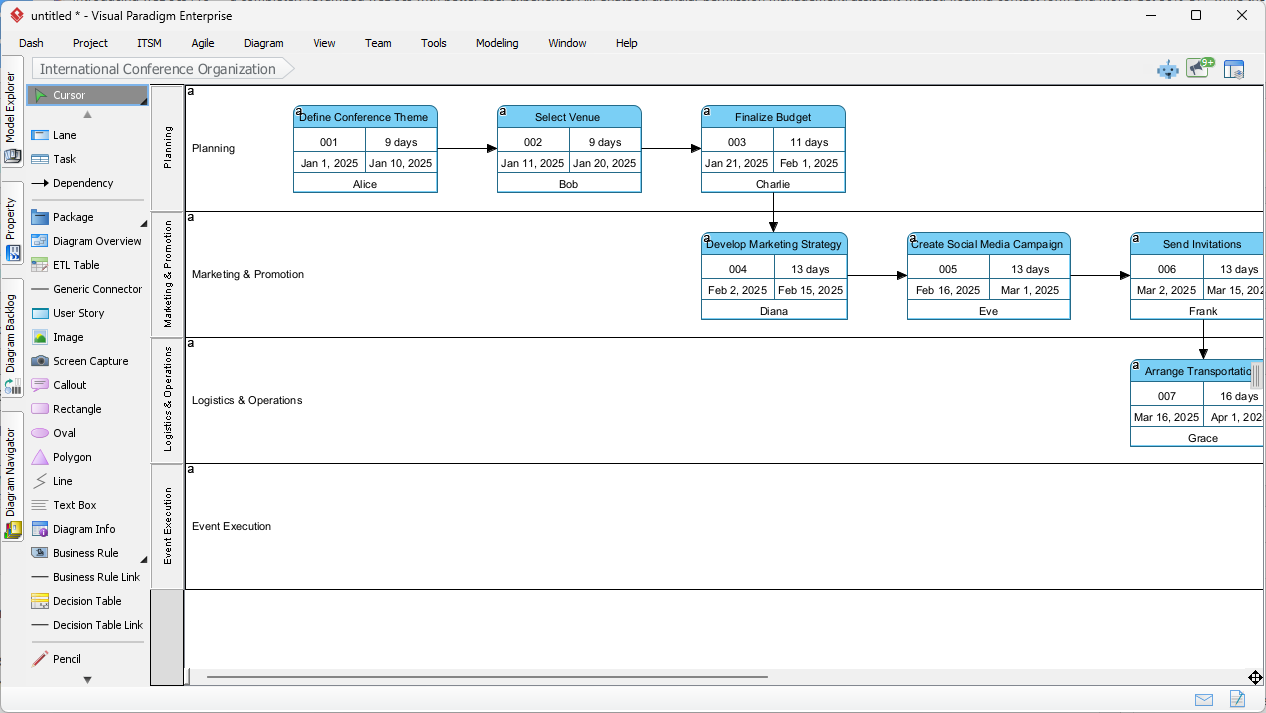
Once the prompt is processed, the professional project scheduling software generates a comprehensive visual model. In the case of conference planning, the AI organizes tasks into logical swimlanes such as Planning, Marketing & Promotion, Logistics & Operations, and Event Execution. Each task node displays essential data, including task IDs, durations, and assigned personnel like “Alice” or “Bob.” This automated layout ensures that even the most complex project architectures are readable and logically sequenced from the start.
The resulting diagram is not just a static image but a fully interactive model. Users can refine the AI’s initial draft by adjusting durations, changing dependencies, or adding specific lags between activities. This hybrid approach—where AI handles 80% of the structural heavy lifting and the human expert provides the final 20% of refinement—drastically improves productivity and reduces the risk of scheduling errors in high-stakes environments.
Key Takeaways for AI-Powered Project Modeling
- Rapid Prototyping: Convert project charters into network diagrams instantly.
- Critical Path Analysis: Automatically identify the longest path to determine the minimum project duration.
- Probabilistic Scheduling: Support for three-point estimates (Optimistic, Most Likely, Pessimistic) to handle uncertainty.
- Multi-Platform Access: Use deep desktop modeling for enterprise needs or an online AI PERT chart tool for quick brainstorming.
- Seamless Refinement: Transition from AI drafts to detailed Gantt charts and resource leveling.
The Versatility of the Visual Paradigm AI Chatbot
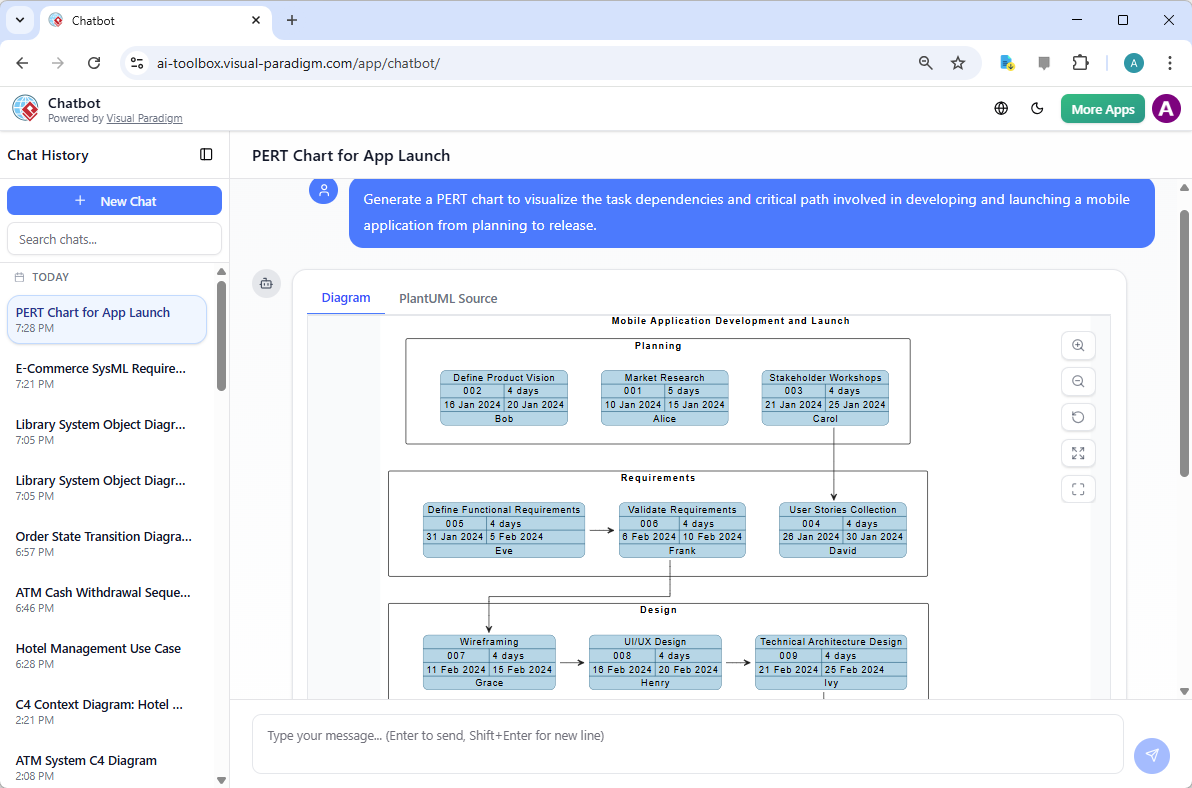
Beyond the desktop application, the Visual Paradigm AI Chatbot serves as a conversational assistant for those who prefer a web-based, interactive experience. Accessible via any browser, this easy-to-use AI diagramming app allows users to type a simple message, such as “Generate a PERT chart for a mobile app launch,” and receive a structured diagram immediately. This is particularly useful for team leads who need to visualize a critical path during a live meeting or brainstorming session without opening a full modeling suite.
The chatbot interface provides a side-by-side view of the diagram and its source logic (such as PlantUML). As demonstrated in the mobile application launch example, the AI identifies phases like Market Research, Stakeholder Workshops, and UI/UX Design. It intelligently calculates the dates and dependencies, providing a clear visualization of how early tasks in the planning phase impact the eventual release date. This conversational interface makes high-level project management techniques accessible to users who may not have extensive training in network diagramming standards.
Core Benefits of Using AI for PERT Chart Generation
Modern project management demands agility and the ability to perform “what-if” analysis on the fly. An AI-powered PERT chart maker facilitates this by allowing users to tweak their project descriptions and regenerate the network diagram in seconds. This speed is essential when exploring different scenarios, such as shortening a marketing campaign or accounting for potential delays in a supply chain.
Automating Manual Calculations
The best AI PERT chart generator does more than just draw lines; it performs the complex math behind the scenes. Traditionally, project planners had to manually perform “forward passes” and “backward passes” to calculate early start/finish and late start/finish times. Visual Paradigm’s AI automates these calculations, identifying the slack (or float) for each task. This ensures that the team knows exactly which tasks can be delayed without impacting the final deadline and which tasks are “critical” and require strict adherence to the schedule.
Supporting Professional Standards
Visual Paradigm ensures that all AI-generated outputs adhere to industry-standard notations. For PERT charts, this includes using event nodes (circles or rectangles) and activity arrows. The software also incorporates the PERT three-point estimate formula: Expected Duration (TE) = (Optimistic + 4*Most Likely + Pessimistic) / 6. By embedding these rigorous methodologies into an automated project network diagram tool, Visual Paradigm guarantees that the output is suitable for formal project documentation and PMP-level reporting.
Real-World Application Workflows
To maximize the efficiency of your project planning, consider the following practical workflows when using the software:
Workflow 1: From Concept to Network Diagram
- Launch the AI Diagram Generation tool within Visual Paradigm Desktop.
- Describe your project sequence in natural language, noting dependencies (e.g., “Marketing starts after Research ends”).
- Generate the PERT chart and review the critical path highlighted by the AI.
- Save the model directly into your project repository for team collaboration.
Workflow 2: Scenario Testing and Risk Assessment
- Create an initial PERT chart for a “best-case scenario.”
- Modify the prompt to include pessimistic time estimates for risky activities.
- Generate a secondary chart to compare the total project duration and identify new bottlenecks.
- Use these comparisons to present a comprehensive risk assessment to stakeholders.
Conclusion: The Future of Project Scheduling
The integration of generative AI into visual modeling represents a paradigm shift for project managers and enterprise architects. By using the best AI PERT chart generator, professionals can move away from the tedious task of manual drawing and focus on strategic decision-making and risk mitigation. Whether you are organizing a global conference or developing the next major mobile application, Visual Paradigm provides the tools to visualize your path to success with precision and speed.
The combination of a powerful desktop modeling environment and a flexible AI chatbot ensures that you have access to professional-grade diagramming whenever and wherever you need it. Embrace the efficiency of AI-driven project management and ensure your next project stays on track and under budget.
Try the Best AI PERT Chart Generator Today
Ready to transform your project planning process? Experience the power of AI-powered visual modeling with Visual Paradigm. You can start generating professional PERT charts, UML diagrams, and enterprise architecture models in just a few clicks.
To get started, visit the official download page: Download Visual Paradigm. Install the desktop edition to access the full suite of AI Diagram Generation features, or explore the AI Chatbot online to see how quickly your ideas can become reality.
Related Links
- Step-by-Step Flowchart Tutorial for Beginners and Experts: Learn how to create effective flowcharts with this detailed tutorial that covers best practices, symbols, and real-world applications for business and technical use.
- Pert Chart Tool – Visual Paradigm Online: Explore the powerful PERT chart tool in Visual Paradigm Online, designed to help project managers visualize task dependencies, estimate timelines, and manage project schedules effectively.
- Complete PERT Chart Tutorial – Visual Paradigm: A step-by-step tutorial guiding users through creating and using PERT charts in Visual Paradigm Online to plan and manage complex projects efficiently.
- Pert Chart User Guide – Visual Paradigm: Detailed user documentation on how to create, edit, and utilize PERT charts within the Visual Paradigm software for robust project management.
- Free PERT Chart Templates – Visual Paradigm: Download and use professionally designed PERT chart templates from Visual Paradigm to kickstart your project planning with minimal setup.
- Pert Chart Tutorial – Visual Paradigm Knowledge Base: An in-depth tutorial on PERT charts, covering their purpose, construction, and application in real-world project management scenarios.
- Enhanced PERT Chart Features – Visual Paradigm: Discover advanced capabilities of Visual Paradigm’s PERT chart tool, including dynamic scheduling, critical path analysis, and integration with project timelines.