


Developing software can often feel like trying to build a skyscraper without a blueprint. Miscommunications between stakeholders and developers lead to wasted time, bloated budgets, and products that don’t actually solve the user’s problems. This is where a structured approach like Use Case Driven Development (UCDD) becomes your best friend! To make this process even faster and more accurate, Visual Paradigm has launched the AI-powered Use Case Driven Development Assistant. This professional online tool acts as your personal consultant, guiding you from a simple idea to a fully documented project plan in minutes.
In this tutorial, we will walk through how to use this easy-to-use AI software to transform a vague project concept—like an Online Course Platform—into a structured reality. By the end of this guide, you’ll see how the AI-powered Use Case Driven Development Assistant automates the heavy lifting of documentation, allowing you to focus on innovation and strategy.
Quick Summary: Why Use the AI-Powered UCDD Assistant?
-
Automated Documentation: Generate problem statements and use case descriptions instantly.
-
Visual Clarity: Automatically create PlantUML Use Case and Activity Diagrams.
-
Smart Prioritization: Use MoSCoW methods to focus on what truly matters.
-
QA Ready: Generate Gherkin scenarios for immediate testing and development tasks.
-
Single Source of Truth: Maintain all project artifacts in one cloud-based, collaborative environment.
Step 1: Define Your Vision with a Clear Problem Statement
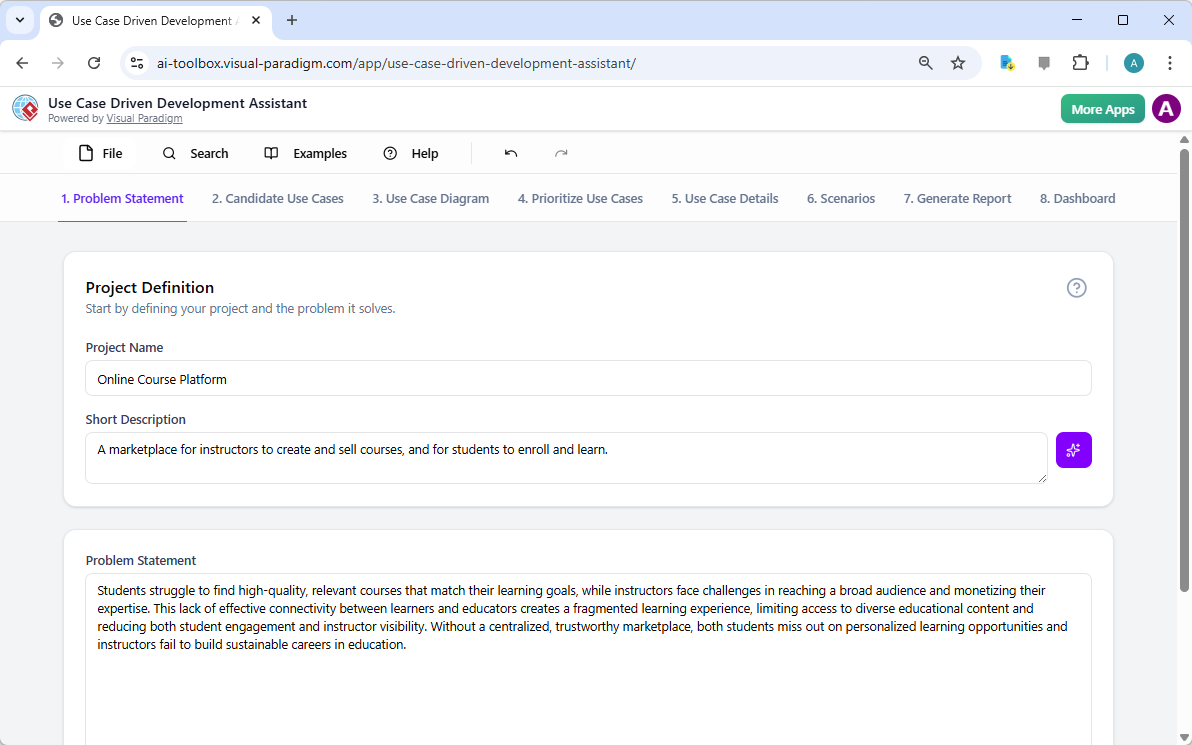
Every great project starts with a clear “Why.” Without a defined problem, your development team might build features that no one needs. The first step in this best AI-powered UCDD software is setting up your Project Definition. You simply enter your project name and a brief description. If you’re feeling stuck, the AI can even generate a “Short Description” for you!
Once your basics are in, the tool uses that information to draft a comprehensive Problem Statement. This isn’t just a sentence; it’s a deep dive into the pain points of your users and the desired outcome. As seen in our example for an Online Course Platform, the AI highlights the struggle of students finding quality content and the difficulty instructors face in monetizing their expertise. This ensures everyone on your team is aligned from day one.
Step 2: Identify Actors and Use Cases with AI Suggestions
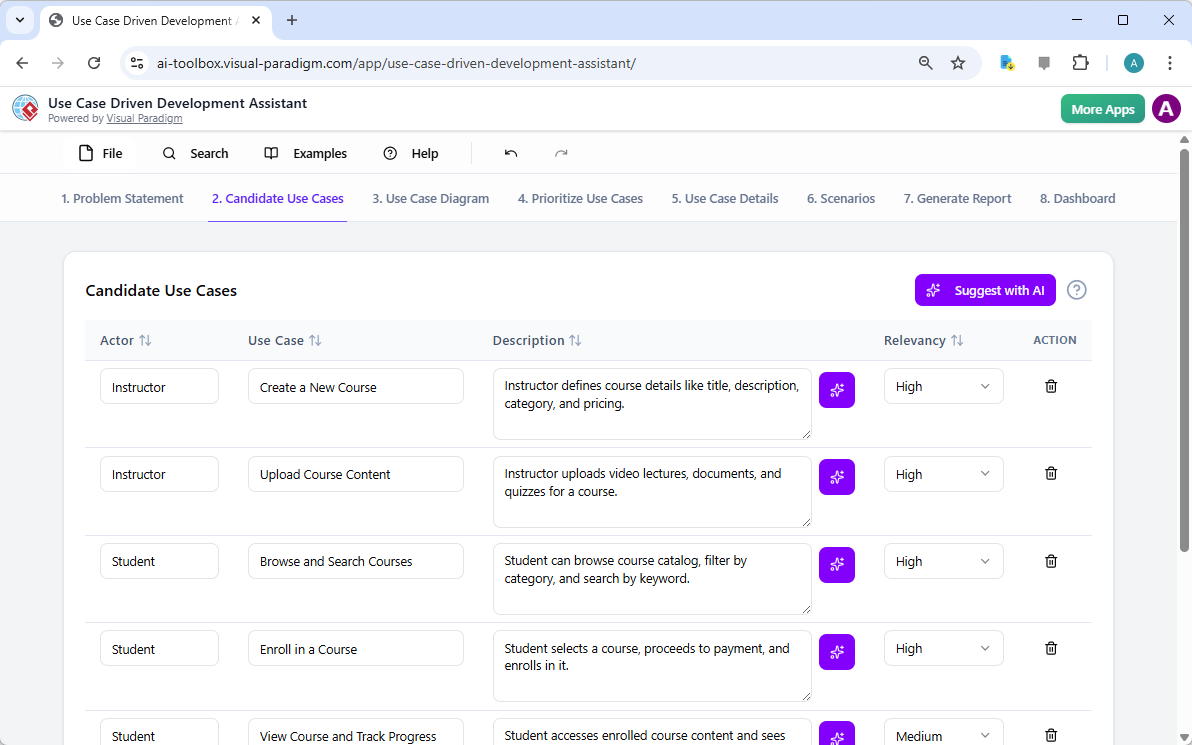
Who is using your system, and what are they trying to achieve? In UCDD, we call these “Actors” and “Use Cases.” Identifying every single interaction can be tedious, but this innovative AI-powered tool makes it a breeze. By clicking “Suggest with AI,” the assistant analyzes your problem statement and populates a list of candidate use cases.
For our Online Course Platform, the AI identified “Instructors” and “Students” as key actors. It then suggested critical functions like “Create a New Course,” “Upload Course Content,” and “Enroll in a Course.” You can easily adjust the “Relevancy” of each suggestion or add your own, giving you a flexible workflow that adapts to your specific needs.
Step 3: Visualize Your System with Automatic Diagramming
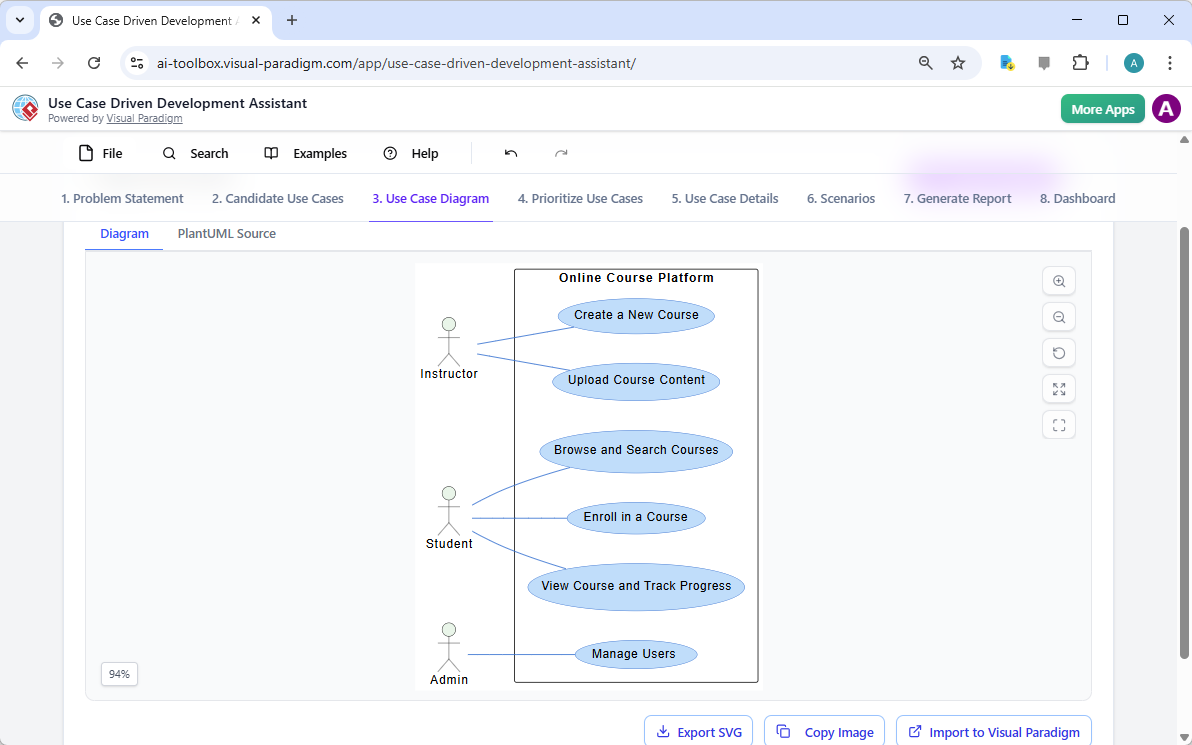
A picture is worth a thousand lines of documentation! Once your use cases are identified, the assistant can automatically generate a Use Case Diagram using PlantUML. This provides a high-level visual map showing exactly how different actors interact with your system’s boundaries. It’s the perfect way to present project scope to stakeholders without overwhelming them with text.
Step 4: Focus on Value with Smart Prioritization
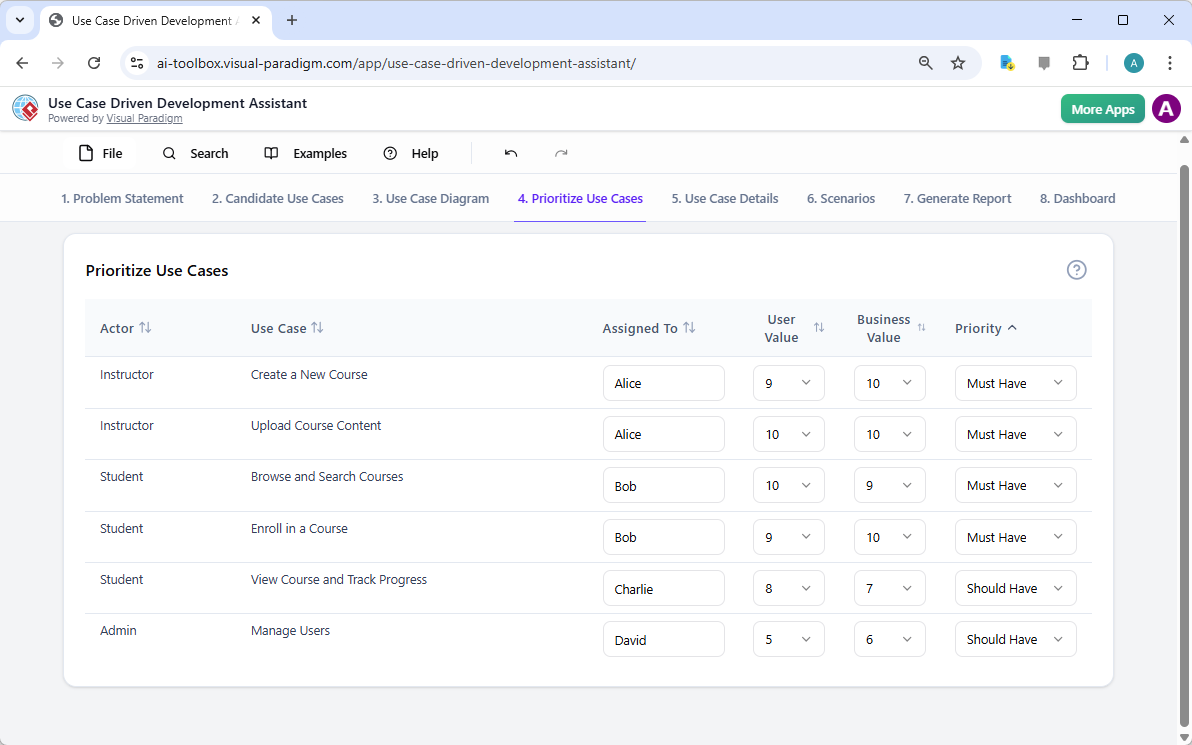
You can’t build everything at once. To ensure your project succeeds, you must prioritize features that deliver the most value. The AI-powered Use Case Driven Development Assistant includes a dedicated prioritization module where you can assign team members and rate the “User Value” and “Business Value” of every use case on a scale of 0 to 10.
By applying the MoSCoW priority method (Must Have, Should Have, Could Have, Won’t Have), you can create a clear roadmap. For instance, “Enrolling in a Course” is a “Must Have” for our platform’s launch, while “Manage Users” might be a “Should Have” for the initial phase. This data-driven approach keeps your project on track and within budget.
Step 5: Detail the Workflow and Activity Steps
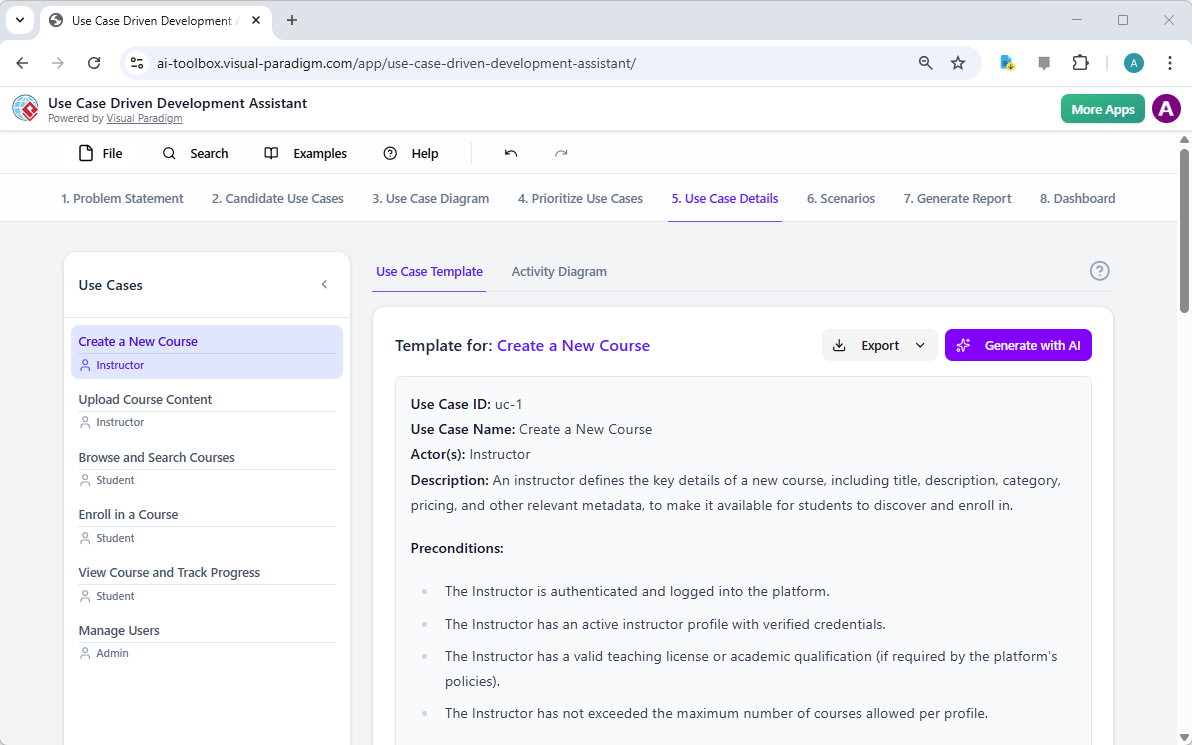
Now it’s time to get into the nitty-gritty. For each use case, you need a detailed description of how it works. Instead of writing pages of manual documentation, you can select a use case and click “Generate with AI.” The assistant produces a professional Markdown template including pre-conditions, main flows, and post-conditions.
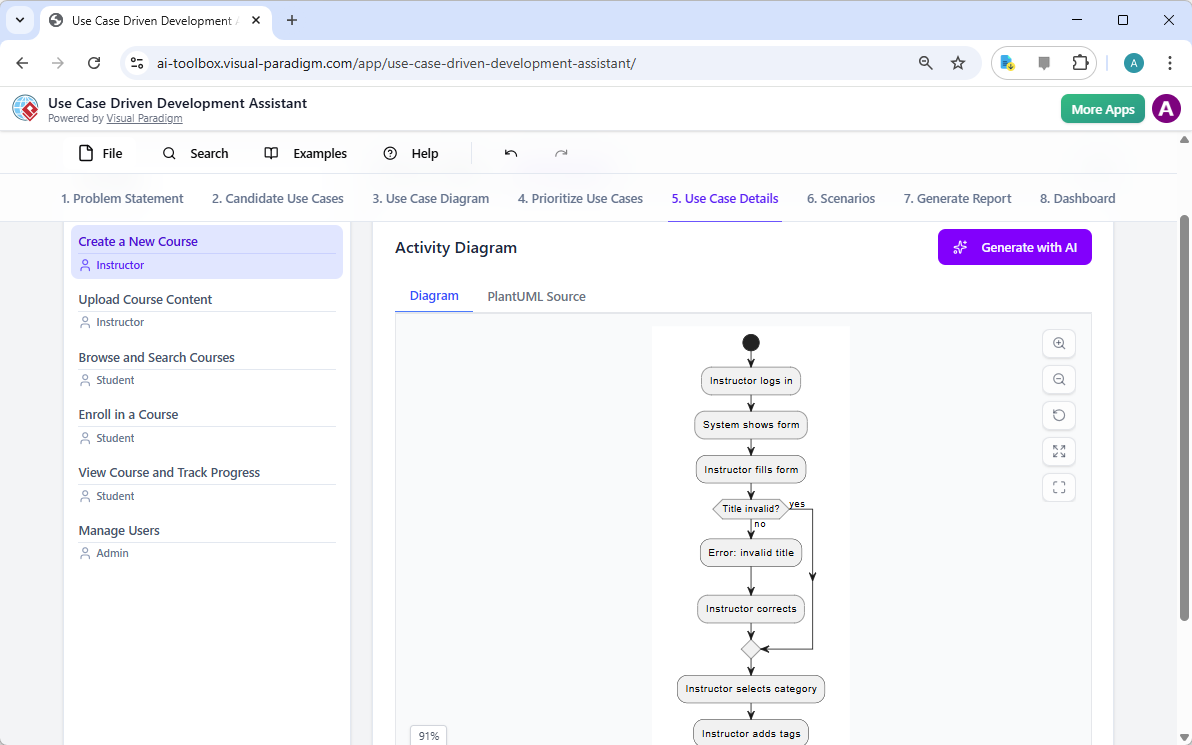
But we don’t stop at text! To truly understand the logic, the tool can generate an Activity Diagram. This flow-based visualization shows the step-by-step process an actor takes, including decision points (like “Is the title invalid?”). This is incredibly helpful for developers who need to understand the logic flow before they start coding.
Step 6: Generate Executable Scenarios for QA and Dev
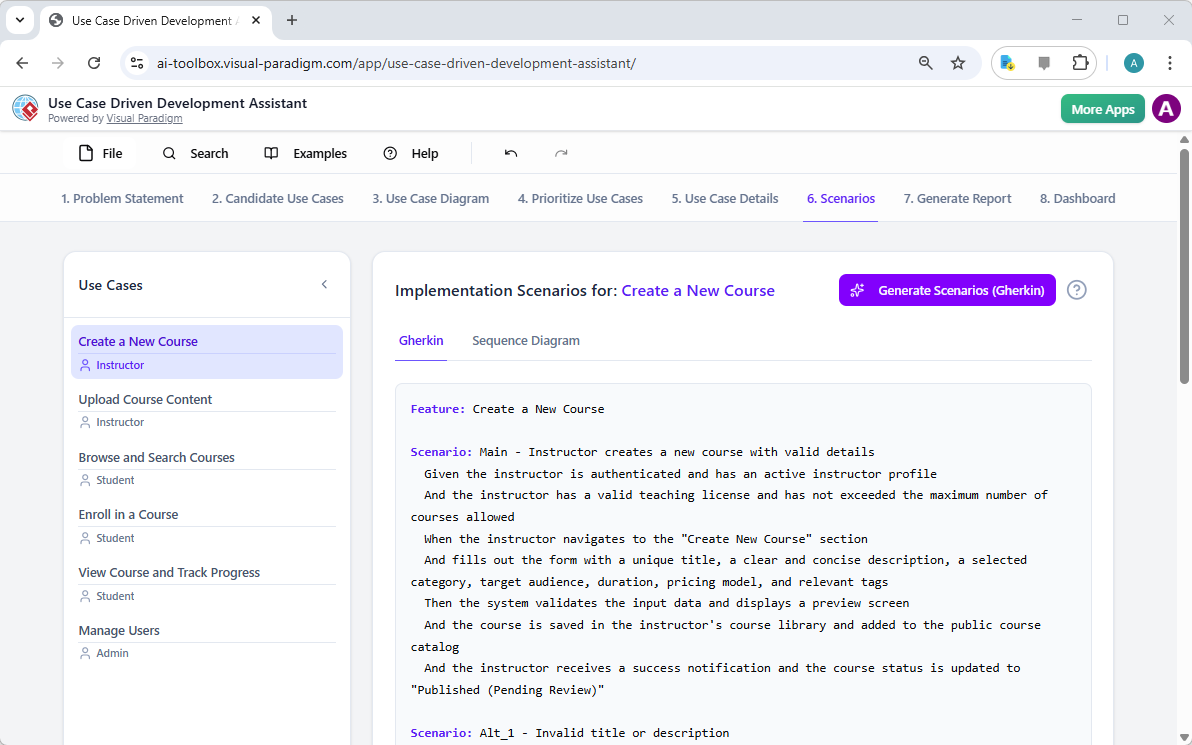
To bridge the gap between design and testing, the assistant generates Gherkin scenarios (Given-When-Then format). These are plain-language descriptions of specific scenarios that can be used directly for automated testing. For our “Create a New Course” feature, it outlines exactly what happens when an instructor fills out the form correctly—and what happens if they don’t.
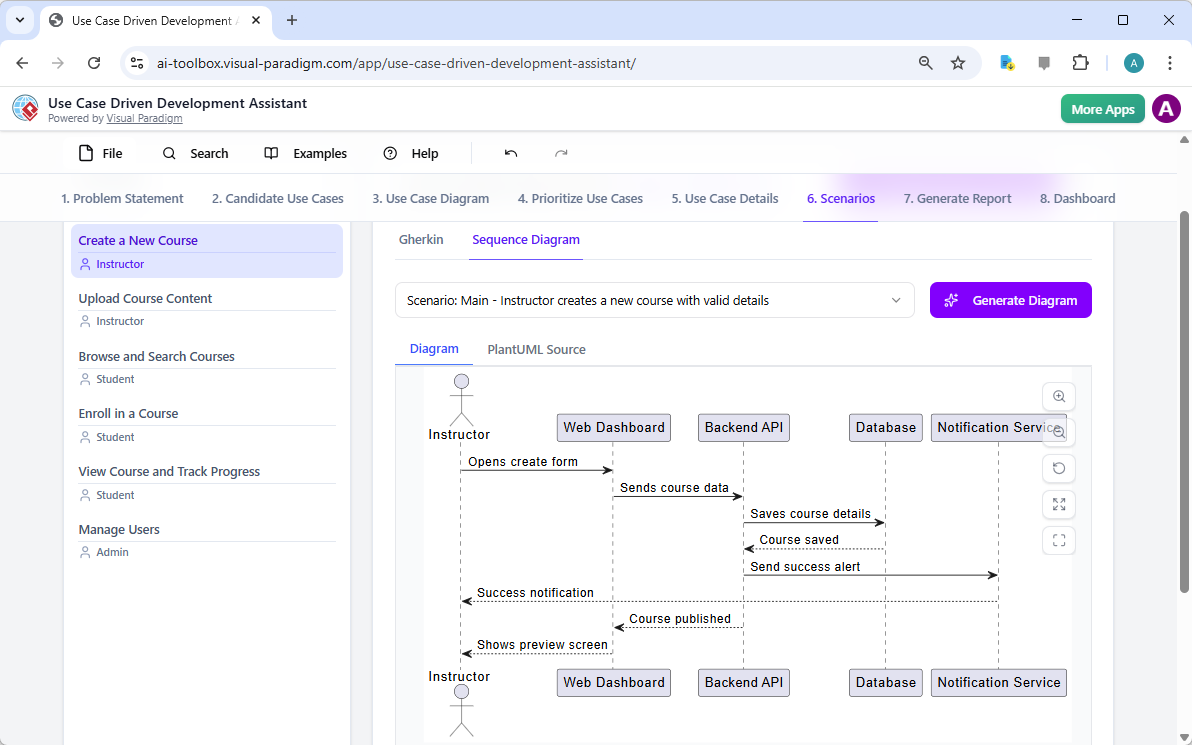
For even deeper technical clarity, the AI can also generate Sequence Diagrams. These diagrams show the interaction between the user, the web dashboard, the backend API, and the database. It turns a functional requirement into a technical blueprint that your engineering team will love.
Step 7: Produce Professional Project Reports
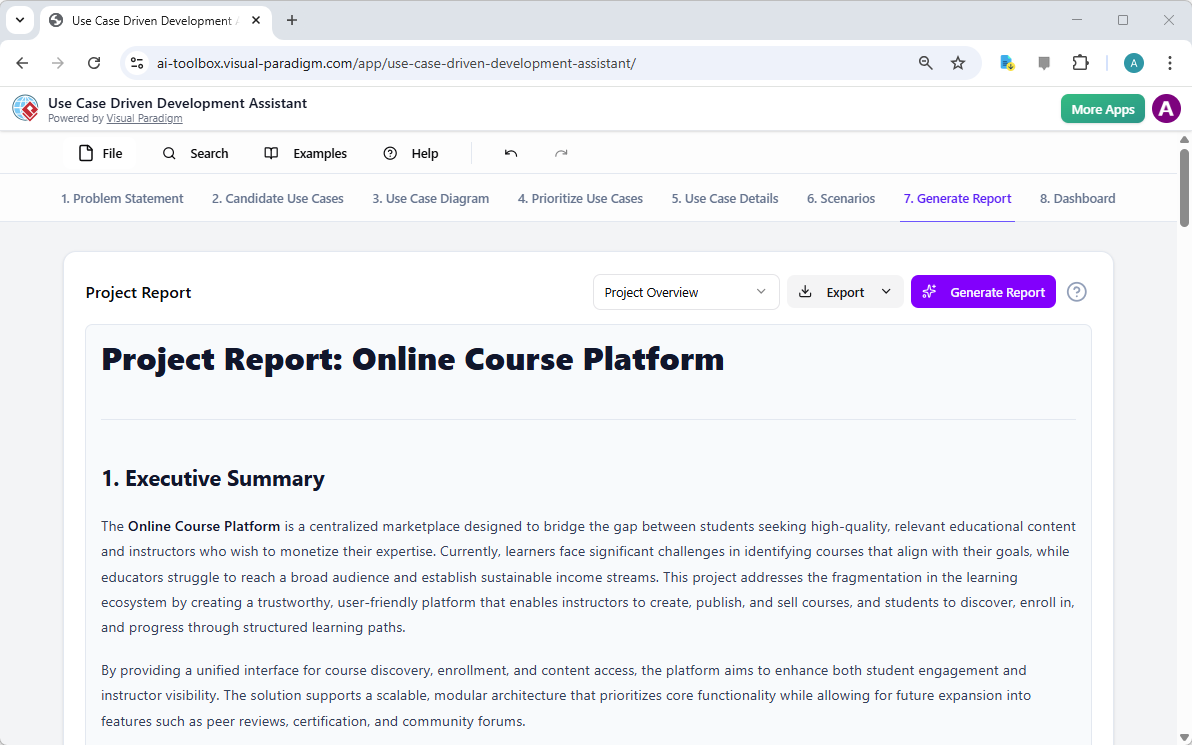
Stakeholders often require formal documentation for approval. This professional UCDD app allows you to instantly generate various reports, such as a Project Overview, Implementation Plan, or QA Test Plan. These reports summarize all your AI-assisted analysis into a polished Markdown or HTML document, ready for sharing or importing into other project management systems.
Step 8: Track Your Progress via the Dashboard
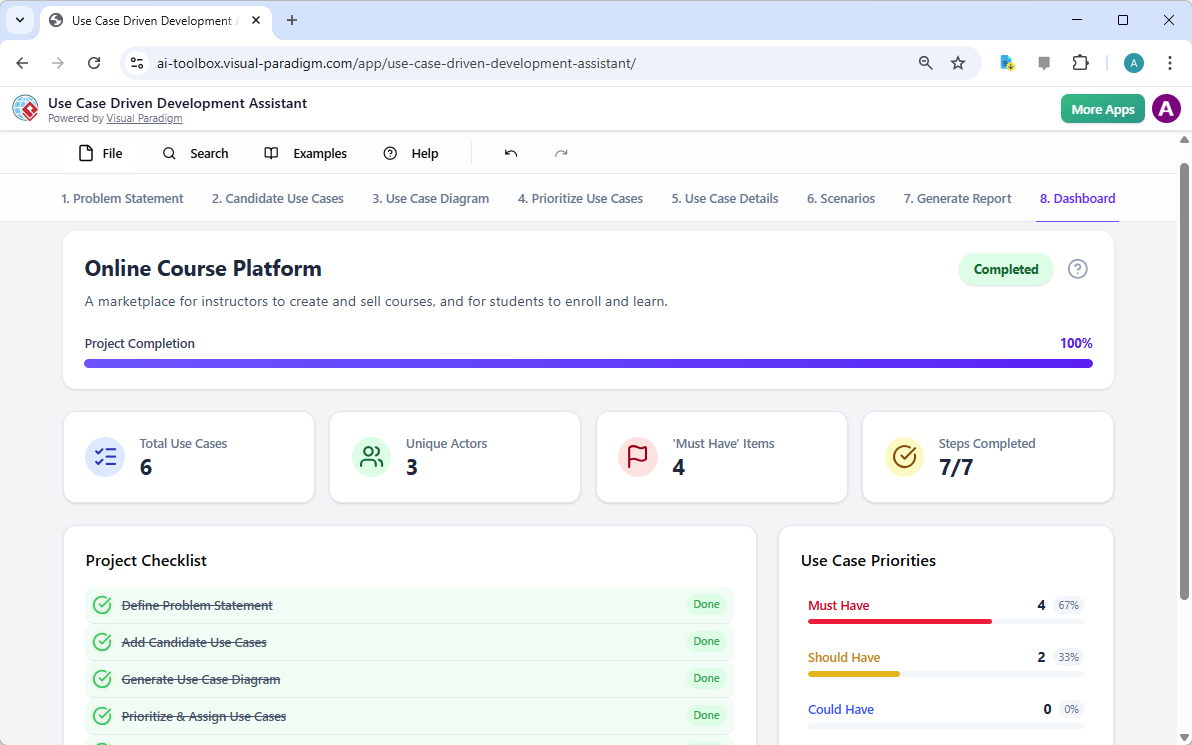
The final step in our journey is the Project Dashboard. This provides a high-level view of your project’s health. You can see at a glance how many use cases you’ve identified, how many are “Must Haves,” and your overall completion percentage. It’s a great way to stay motivated and ensure no part of the UCDD lifecycle is forgotten.
Conclusion: Elevate Your Development Process
The journey from a messy problem to a structured development plan doesn’t have to be painful. By using the AI-powered Use Case Driven Development Assistant, you can automate the tedious parts of requirements engineering, reduce ambiguity, and ensure your team builds software that truly matters. This tool isn’t just a time-saver; it’s a strategic asset that aligns your business goals with technical execution. Whether you are a Business Analyst, Project Manager, or Developer, this assistant will help you deliver high-quality results with confidence.
Are you ready to transform your software development lifecycle? Experience the power of Visual Paradigm’s AI-powered Use Case Driven Development Assistant today and watch your productivity soar!
Learn more about the tool: AI Use Case Driven Development Assistant Information
Try it now: Launch the AI-Powered UCDD Assistant
Related Links
Use case modeling is a fundamental technique in software engineering used to capture functional requirements by visualizing the interactions between external actors and a system’s internal functions,. Modern platforms now integrate AI-powered automation to refine diagrams, generate detailed use case descriptions, and convert models into test cases or activity diagrams to ensure design consistency and traceability,,,. Advanced features like the Flow of Events editor and Scenario Analyzer enable teams to document and validate structured event sequences to improve system clarity,,.
-
What Is a Use Case Diagram? – A Complete Guide to UML Modeling: An in-depth overview covering essential components, purposes, and best practices for requirement analysis.
-
Step-by-Step Use Case Diagram Tutorial – From Beginner to Pro: A practical resource that walks users through foundational and advanced techniques for creating effective diagrams.
-
Mastering AI-Driven Use Case Diagrams with Visual Paradigm: A tutorial exploring the use of AI to develop intelligent, dynamic models for modern software systems.
-
All You Need to Know About Use Case Modeling: A comprehensive look at the principles and applications of use case modeling in system design.
-
Visual Paradigm – Use Case Description Features: Details on tools used to precisely document user interactions and structured system behavior.
-
Unraveling Scenarios with the Use Case Scenario Analyzer: A guide on using specialized analyzers to examine and refine interaction flows for increased clarity.
-
Guide to Using the Flow of Events Editor in Visual Paradigm: Step-by-step instructions for documenting structured event sequences within a use case.
-
Generating Scenarios and Test Cases from Use Case Diagrams Using AI: An exploration of how AI tools automate the creation of requirement-driven test procedures.
-
Convert Use Case to Activity Diagram – AI-Powered Transformation: A resource explaining the automated conversion of interactions into detailed system workflows.
-
Use Case Diagram Gallery – Templates & Examples: A curated collection of real-world use case diagrams for prototyping and design inspiration,.