


The transition from a conceptual business process to a structured visual model often represents a significant hurdle for many professionals. Whether one is designing a complex software algorithm or a standard operating procedure for a service team, the initial effort required to organize shapes and connectors can be quite daunting. Fortunately, the emergence of the AI flowchart generator within Visual Paradigm Desktop has fundamentally altered this landscape. By leveraging sophisticated natural language processing, this tool allows individuals to transform a simple textual description into a comprehensive, standards-compliant diagram in a matter of seconds. It is a remarkable advancement that serves to bridge the gap between abstract thought and concrete visualization, ensuring that technical and non-technical stakeholders alike can communicate with absolute clarity.
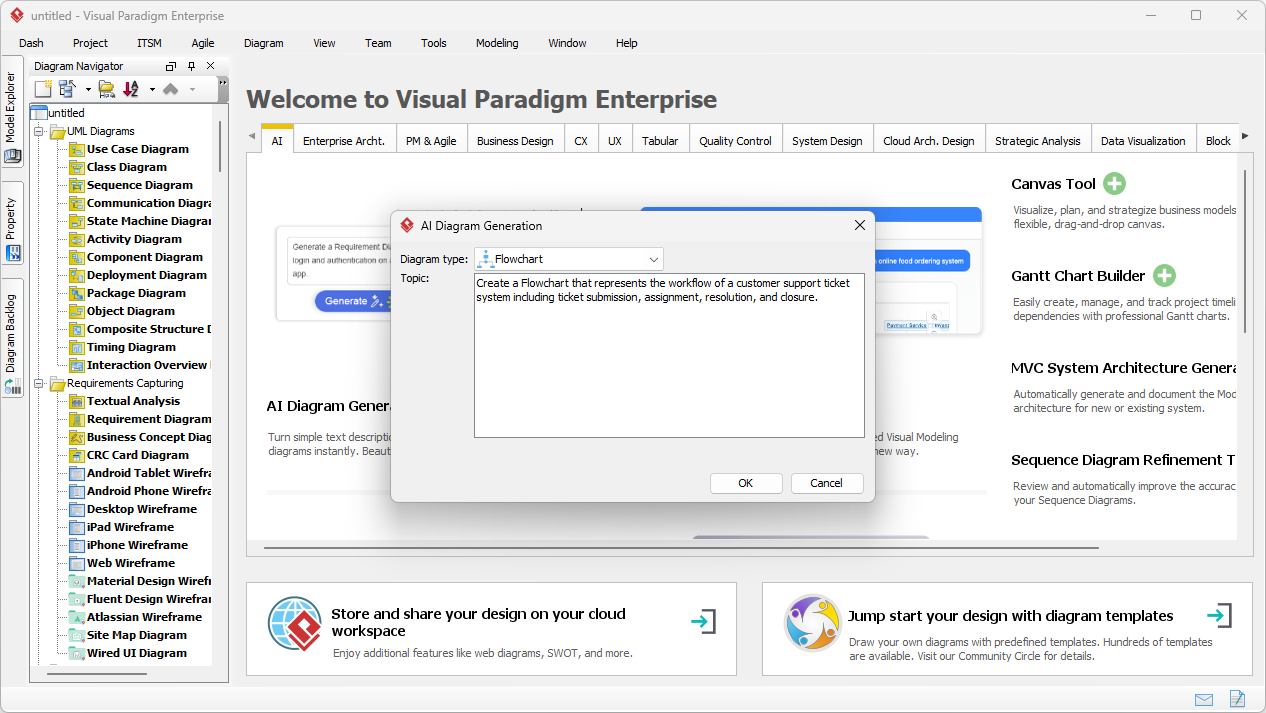
In our first visual reference, we observe the intuitive interface of the Visual Paradigm Desktop application. A central dialogue box titled “AI Diagram Generation” is visible, where the user has selected “Flowchart” as the target diagram type. Within the topic input area, a clear and descriptive prompt has been entered: “Create a Flowchart that represents the workflow of a customer support ticket system including ticket submission, assignment, resolution, and closure.” This interaction illustrates the foundational step of the AI-driven workflow, where the user provides the necessary context for the intelligent engine to begin its analysis of the process logic, decision points, and sequential steps involved in a typical support environment.
Key Takeaways for AI-Driven Process Modeling
- Instant Visualization: Transform descriptive text into professional flowcharts without the need for manual drawing or alignment of symbols.
- Standardized Notation: The AI automatically applies correct flowchart symbols, such as diamonds for decisions and rectangles for processes, ensuring industry-standard compliance.
- Enhanced Productivity: By automating the initial 80% of the modeling effort, users can focus their energy on refining specific details and optimizing the actual business logic.
- Flexible Refinement: Generated diagrams are fully editable, allowing for the addition of swimlanes, annotations, and complex branching logic after the initial creation.
- Comprehensive AI Ecosystem: Beyond flowcharts, Visual Paradigm supports over 40 diagram types, including UML, SysML, and ArchiMate, through its integrated AI capabilities.
Visual Paradigm has successfully evolved into a robust AI-powered visual modeling ecosystem. This transformation is not limited to simple flowcharts; it encompasses a wide array of specialized tools designed for software architects, enterprise designers, and project managers. By integrating generative AI directly into the desktop environment and offering a conversational AI visual modeling chatbot, the platform provides multiple entry points for creation. One might utilize the desktop edition for deep, offline modeling and code engineering, or turn to the web-based chatbot for rapid brainstorming and iterative refinement of C4 models or McKinsey 7S frameworks. This versatility ensures that regardless of the complexity of the system being described, a professional-grade visual representation is always within reach.
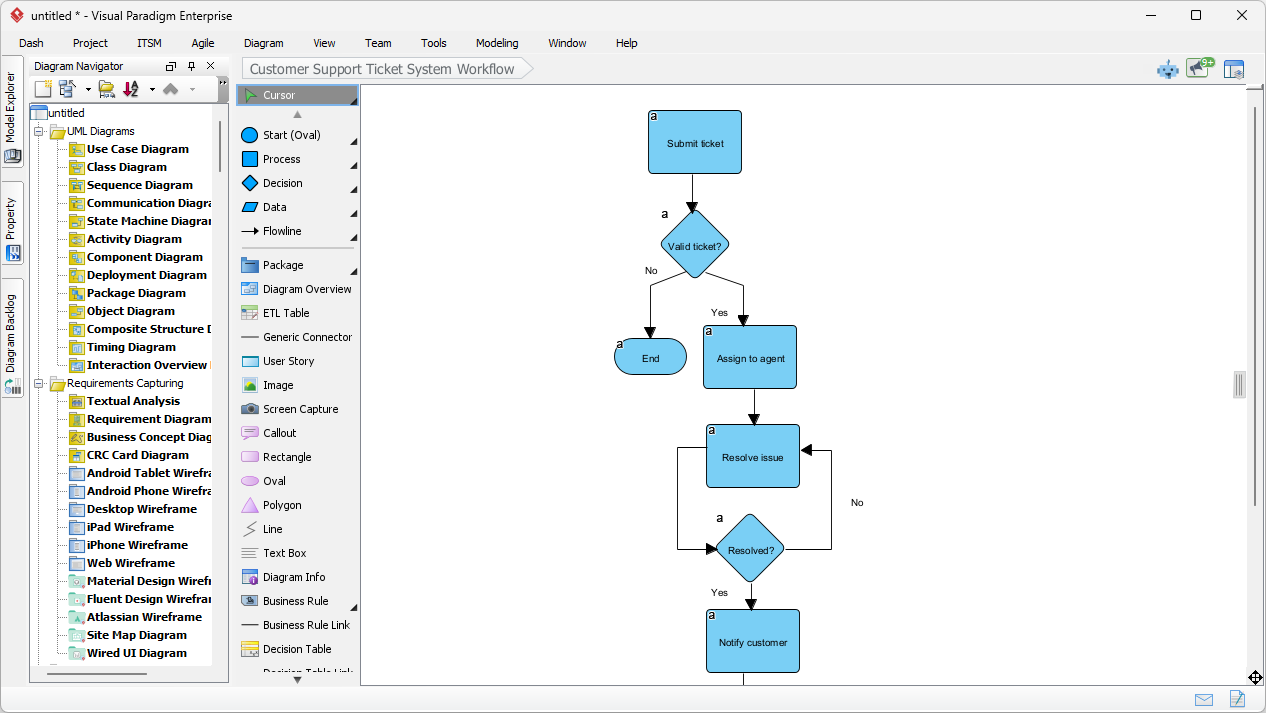
When we examine the results of the generation process, as seen in our second visual reference, the efficiency of the best AI visual modeling software becomes apparent. The previously entered description of a support ticket system has been translated into a clean, top-down flowchart. The diagram begins with a “Submit ticket” process box, followed immediately by a decision diamond labeled “Valid ticket?”. Depending on the outcome, the flow branches logically: an invalid ticket leads to the end of the process, while a valid one proceeds to “Assign to agent.” This automated layout includes necessary loops, such as the cycle between “Resolve issue” and the “Resolved?” decision point, demonstrating the AI’s ability to infer complex control flows from simple sentences. It is a polished starting point that requires very little manual adjustment to be presentation-ready.
The Pedagogical Approach to Flowcharting with AI
To master this easy-to-use flowchart app, it is helpful to understand the underlying logic that the AI employs. When you provide a description, the engine identifies verbs as actions (rectangles) and conditional phrases—such as “if,” “when,” or “depending on”—as decision points (diamonds). To achieve the most accurate results, one should strive to be as detailed as possible in their descriptions. For instance, rather than simply stating “the system checks the data,” it is more effective to say “the system validates the user input; if the data is correct, it saves the record, otherwise, it displays an error message.” This level of specificity allows the AI to construct a more nuanced and accurate representation of the intended logic.
Furthermore, the integration within Visual Paradigm Desktop means that the journey does not end with a static image. Once the professional flowchart software has produced the initial draft, the user can leverage the full suite of modeling tools. This includes adding swimlanes to denote departmental responsibilities, linking process steps to detailed requirement documents, or even exporting the diagram into various formats such as PDF or SVG for inclusion in official documentation. It is a seamless transition from an AI-generated prototype to a rigorous, enterprise-ready model that can be maintained throughout the entire project lifecycle.
Step-by-Step Guide to Generating Your First Flowchart
For those eager to begin their journey with AI diagram generation, the process is designed to be straightforward and accessible. First, one must launch the Visual Paradigm Desktop application and either create a new project or open an existing one. Navigating to the “Tools” menu and selecting “AI Diagram Generation” will reveal the necessary interface. After selecting “Flowchart” from the dropdown list, the user enters their process description. Upon clicking “OK,” the software performs the analysis and layout automatically. The final step involves reviewing the generated structure in the editor, where one can perform a gentle refinement of the labels or arrangement to perfectly suit their specific organizational standards.
In conclusion, the ability to generate high-quality visual models through natural language represents a significant leap forward in professional communication. By utilizing an AI-powered flowchart maker, teams can reduce the time spent on tedious manual drawing and instead focus on the substantive aspects of process improvement and system design. Visual Paradigm provides the necessary tools to ensure that these visualizations are not only easy to create but also technically accurate and fully integrated into a broader modeling strategy. Whether you are a seasoned software developer or a business analyst documenting a new workflow, these AI capabilities offer a patient and reliable assistant to help you visualize your ideas with precision and professional flair.
We invite you to experience the future of visual modeling today. To begin using these innovative features, you may download the application by following the instructions provided on our official website. Enhance your productivity and bring clarity to your most complex processes with the industry’s most advanced diagramming tools.
Try Visual Paradigm Today: Download Visual Paradigm Desktop and start transforming your text into professional diagrams with the power of AI.
Related Links
- Powerful Online Flowchart Tool with Drag-and-Drop Interface: Discover a comprehensive, web-based flowchart tool that enables users to create, edit, and share flowcharts with ease using intuitive drag-and-drop functionality.
- Step-by-Step Flowchart Tutorial for Beginners and Experts: Learn how to create effective flowcharts with this detailed tutorial that covers best practices, symbols, and real-world applications for business and technical use.
- Free Online Flowchart Maker with Advanced Features: Create professional flowcharts for free with this robust online tool that supports templates, collaboration, and export to multiple formats.
- Feature-Rich Flowchart Maker for Business and Technical Teams: Explore a full-featured flowchart creation tool with support for collaboration, version control, and integration with other business tools.
- Free Online Flowchart Editor with Real-Time Collaboration: Use this free, browser-based flowchart editor to design, edit, and collaborate on flowcharts in real time with team members worldwide.